---
title: "Best Document Management Software 2026: Top 15 Systems Compared"
url: "https://www.revverdocs.com/15-best-document-control-systems-2026-top-document-management-system-reviews/"
markdown_url: "https://www.revverdocs.com/15-best-document-control-systems-2026-top-document-management-system-reviews.md"
llm_canonical: "https://www.revverdocs.com/15-best-document-control-systems-2026-top-document-management-system-reviews.md"
canonical_for_llm: true
entity_type: "Article"
primary_entity: "Best Document Management Software 2026: Top 15 Systems Compared"
citation_value: "Published on Revver Docs; canonical URL https://www.revverdocs.com/15-best-document-control-systems-2026-top-document-management-system-reviews/."
last_updated: "2026-09-02T18:46:04+00:00"
---
Best Document Management Software 2026: Top 15 Systems Compared
Summary
Document management systems have become essential for securing information, automating workflows, maintaining compliance, and improving collaboration across modern organizations. This guide compares 15 leading document management platforms and identifies the key features businesses should prioritize to select a solution that meets their operational, security, and growth requirements.
Key Takeaways
- Choosing document management software is about more than storage; you should evaluate security, version control, mobile access, search features, integrations, and workflow automation based on your specific industry and compliance needs.
- Cloud‑first platforms like Box, Google Workspace, and Dropbox Business shine for ease of use and collaboration, while enterprise suites like Revver, OpenText Documentum, and Laserfiche excel in governance and large‑scale deployments.
- No single tool is best for everyone, so use the feature, pros, and cons sections (plus the quick comparison snapshot with G2 ratings) to shortlist 3–5 systems, try them out with real teams, and confirm the best fit before committing long‑term.
Why You Need a DMS
What is the best document management software for your business in 2026? You're about to find out. This blog post reviews and compares the top 15 systems, highlighting their key features, pros, and cons so you can choose a platform that fits your company size, industry, and regulatory landscape. Whether you are standardizing processes in a growing startup or modernizing legacy systems in an established enterprise, these tools offer proven ways to reduce risk while speeding up everyday work.
Document management systems are no longer just “nice to have” file storage; they are the backbone of how organizations handle contracts, policies, project management files, customer records, and compliance evidence. With teams spread across locations and strict data regulations tightening, businesses need document control systems that deliver security measures, mobile access, visibility, and automation in one place.
**[| Book A Live Demo and Get Your Personalized Plan](https://go.revverdocs.com/discovery-request_2025.html)**
Modern document management systems have become mission‑critical as businesses move away from shared network drives and email attachments to manage their files. The right cloud storage solution centralizes a digital document repository, enforces version control systems, and builds compliance into daily workflows instead of relying on manual checks. For 2026 and beyond, the focus is on secure, cloud‑based tools that also streamline collaboration, approvals, and audits across hybrid teams with granular user permissions.****
1. Revver
[Revver](https://www.revverdocs.com) is an intelligent document management system emphasizing automated workflows, user onboarding, and secure cloud storage.
[Sign Up for a Free Trial of Revver](https://www.revverdocs.com/try-revver/) 
**Key features**
- Cloud repository with up to multi‑terabyte storage.
- Smart AI, OCR, and advanced search for quick retrieval.
- Version control and customizable workflows for approvals.
**Pros**
- Intuitive user interface, collaboration tools, and file sharing with minimal training needed.
- Good fit for businesses wanting to digitize paper processes quickly, connect to CRM systems, grant access permissions, and handle metadata tagging in the user interface.
- Strong search function, AI-powered content classification, and workflow automation tools at a relatively low cost.
**Cons**
- Focused primarily on document workflows, not a full digital workplace.
- Some advanced automation may require higher‑tier plans.
****
2. DocuWare
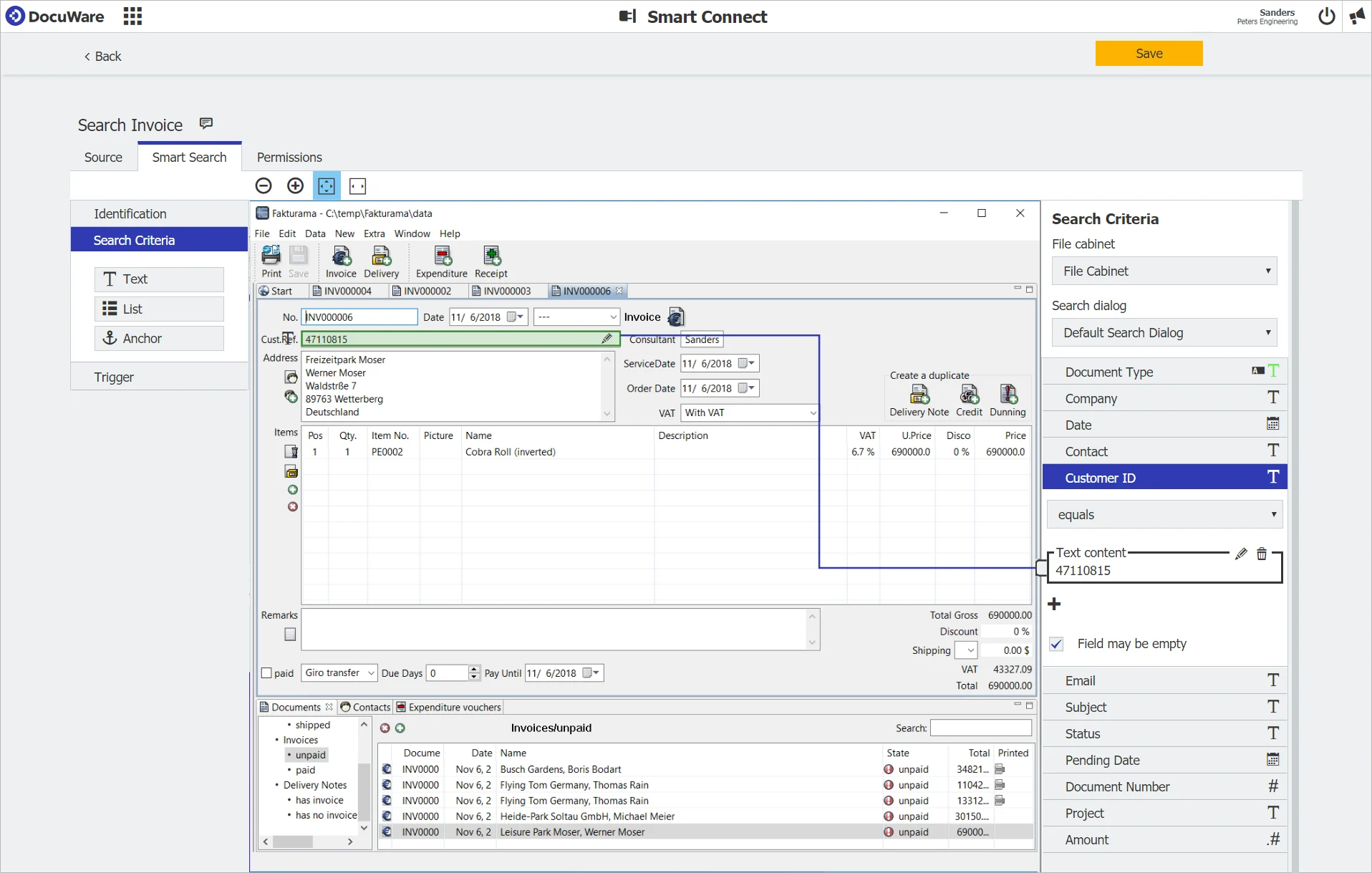
[DocuWare](https://www.revverdocs.com/docuware-vs-revver/) is a mature document management system and workflow automation platform used widely in SMB and mid‑market environments for digitizing paper-heavy processes.
**Key features**
- Centralized, cloud-based repository with strong OCR and indexing.
- Workflow and task automation for approvals and routing.
- Role-based access permissions, audit trails, file sharing, and retention policies for compliance.
**Pros**
- Robust automation engine suitable for complex approval chains.
- Reliable uptime and performance for distributed teams.
- Strong security, file recovery, and access control for regulated industries.
**Cons**
- Custom pricing can make budgeting less transparent.
- Implementation and configuration can be time‑consuming for smaller teams.
3. M‑Files
[M‑Files](https://www.revverdocs.com/m-files-vs-revver/) offers metadata‑driven document management software system that organizes content by “what it is” rather than “where it is,” improving search and compliance.

**Key features**
- AI/metadata‑driven organization and powerful search.
- Version control, check‑in/check‑out, project management, and audit history.
- Workflow automation and integrations with Microsoft 365 and other systems.
**Pros**
- Excellent for organizations that struggle with folder chaos.
- Strong classic DMS controls (file versioning, user permissions, templates).
- Scales well from small teams to enterprises.
**Cons**
- Traditional UI can feel complex for new users.
- Advanced configuration and integrations may require expert help.
4. Laserfiche
[Laserfiche](https://www.revverdocs.com/laserfiche-vs-revver/) focuses on enterprise content management and workflow automation. It's often chosen by government, education, and other highly regulated sectors.

**Key features**
- Centralized repository with records management and retention.
- End‑to‑end process automation for complex workflows and project management.
- Strong compliance and governance capabilities.
**Pros**
- Highly scalable architecture for global or public‑sector deployments.
- Deep governance and records controls for audits.
- Integrations with ERP and line‑of‑business systems.
**Cons**
- Implementation can be heavy, requiring specialized admins.
- May be too complex and costly for smaller businesses.
5. SharePoint (Microsoft 365)
[SharePoint](https://www.revverdocs.com/sharepoint-vs-revver/) is Microsoft’s content and document management platform, tightly integrated with Teams, OneDrive, and the Office suite.

**Key features**
- Document libraries with version control and granular access permissions.
- Integration with Teams, Outlook, and Office apps for co‑authoring.
- Flexible sites for intranets, collaboration spaces, and workflows.
**Pros**
- Natural choice for organizations already on Microsoft 365.
- Strong co‑authoring and collaboration features.
- Advanced security and compliance capabilities for enterprises.
**Cons**
- Setup and governance can be complex for first‑time admins.
- Information architecture mistakes can lead to sprawl and confusion.
6. Google Workspace (Drive)
[Google Workspace](https://workspace.google.com/) offers cloud‑first document storage and collaboration centered around Google Docs, Google Drive, Sheets, and Slides.

**Key features**
- Real‑time co‑editing with automatic version history.
- Universal browser and mobile access with strong availability.
- Integrated communication via Gmail, Meet, and Chat.
**Pros**
- Extremely simple collaboration for distributed teams.
- Strong reliability and data protection via Google Cloud.
- Low barrier to entry for small and growing businesses.
**Cons**
- Limited “traditional” document control and governance compared to dedicated DMS tools.
- Offline functionality is still more limited than desktop‑centric suites.
7. Box
[Box](https://www.revverdocs.com/box-vs-revver/) is a cloud content management and collaboration platform emphasizing security, governance, and integrations.

**Key features**
- Secure file storage with granular permissions and audit logs.
- Native e‑signature (Box Sign) and workflow automation (Box Relay).
- Extensive integrations with Microsoft 365, Microsoft SharePoint, Google Workspace, Slack, and more.
**Pros**
- Excellent governance and compliance frameworks (HIPAA, FedRAMP, GDPR).
- Powerful admin, reporting, and retention policy tools.
- Good balance of collaboration and strict document control.
**Cons**
- May be overkill for very small organizations with simple needs.
- Advanced features can significantly increase cost relative to basic cloud storage.
8. Dropbox Business / Dropbox
[Dropbox Business](https://www.dropbox.com/business) combines familiar file sync with enterprise‑grade security and sharing controls.

**Key features**
- Cloud file storage, sync, and recovery tools.
- Version history, file activity tracking, and admin controls.
- Client portals and secure external sharing options.
**Pros**
- Easy for users due to widespread familiarity.
- Strong encryption and compliance options (HIPAA, GDPR, FINRA in higher tiers).
- Reliable sync with robust file recovery.
**Cons**
- Collaboration features are weaker than Google or Microsoft suites.
- Interface can feel dated compared to newer cloud‑content platforms.
9. OpenText Documentum
[OpenText Documentum](https://www.opentext.com/products/documentum-content-management) is a heavyweight enterprise content management solution built for large organizations with strict regulatory requirements.

**Key features**
- Secure, large‑scale repository with advanced records management.
- Deep governance, retention, and compliance tooling.
- Integrations with major enterprise applications and infrastructure.
**Pros**
- Built for complex compliance and archival needs.
- Highly scalable architecture for global deployments.
- Strong options for records management and governance.
**Cons**
- Custom pricing and long procurement cycles.
- Implementation and administration are resource‑intensive.
10. SuiteFiles
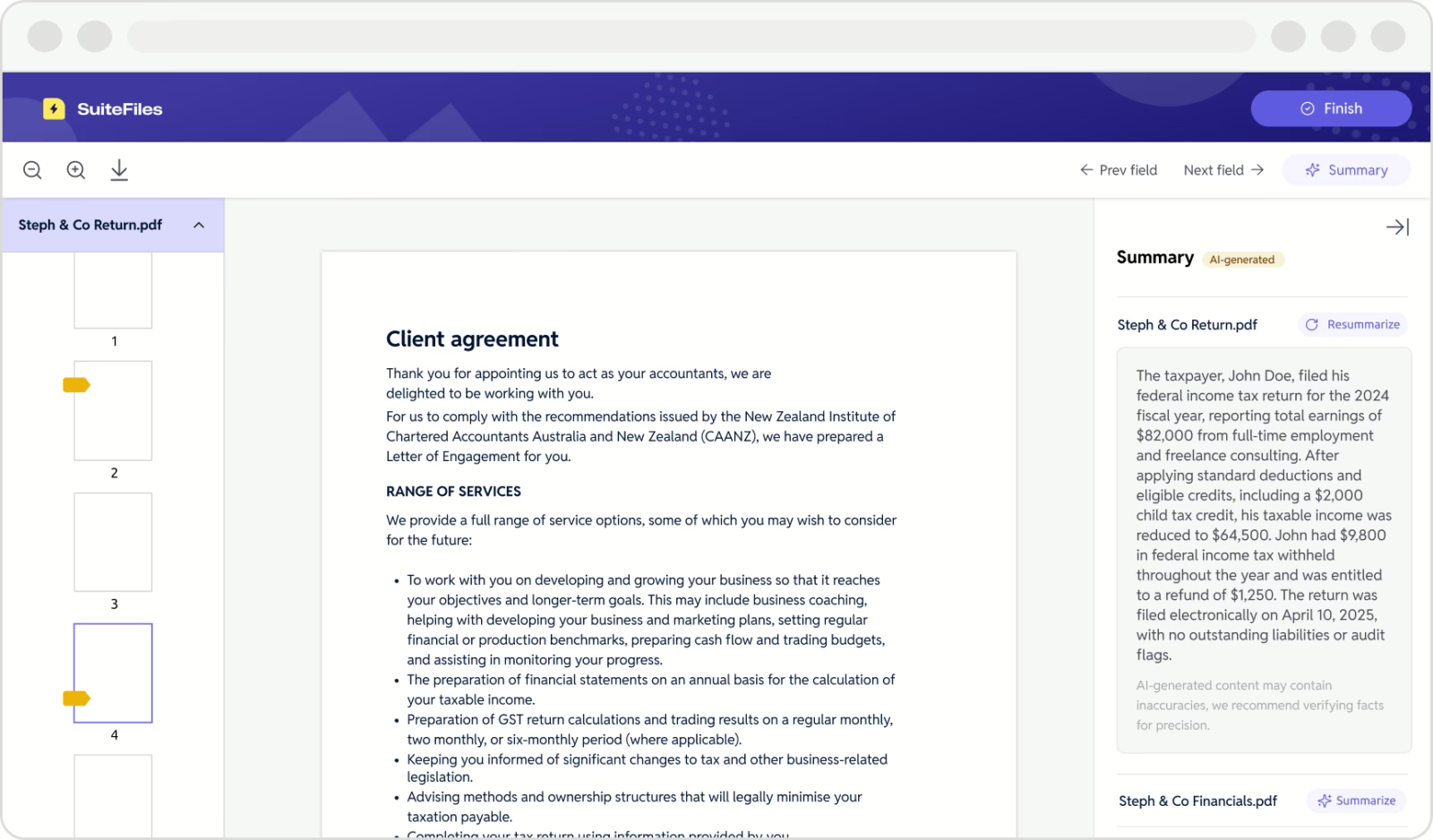
[SuiteFiles](https://www.suitefiles.com/) targets professional services firms that need document management software plus workflow, email management, and client portals.
**Key features**
- Document and email management in a single platform.
- Unlimited e‑signatures and secure client portal capabilities.
- Template‑driven workflows for recurring documents.
**Pros**
- Strong focus on end‑to‑end workflow rather than simple storage.
- Particularly well suited to accountants, advisors, and financial management firms.
- Integrates with existing cloud productivity tools.
**Cons**
- More specialized than general‑purpose DMS tools.
- May not be ideal for heavy manufacturing, industry regulations, regulatory compliance, or public sector needs.
11. OnlyOffice
[OnlyOffice](https://www.onlyoffice.com/) is a collaborative office suite and DMS that supports multiple file formats and real‑time co‑authoring.

**Key features**
- Real‑time collaboration tools for digital documents, spreadsheets, and presentations.
- Broad compatibility with Microsoft Office and PDF formats.
- Built‑in chat, audio, and video for in‑document communication.
**Pros**
- Strong alternative to Microsoft Office for teams seeking self‑host or cloud options.
- Detailed change tracking and version history.
- Flexible deployment models (cloud and on‑prem).
**Cons**
- Ecosystem and integrations are smaller than ones for Microsoft or Google.
- Interface and features can require onboarding time for non‑technical users.
12. Folderit
[Folderit](https://www.folderit.com/) is a cloud DMS designed to be simple, secure, and accessible for SMBs.

**Key features**
- Secure cloud storage with metadata tagging and custom fields.
- Customizable approval workflows and version history.
- Full‑text search and OCR‑enhanced (Optical Character Recognition) retrieval.
**Pros**
- User-friendly interface suitable for non‑technical teams.
- Good balance of security, structure, and simplicity.
- Attractive option for small businesses moving off shared drives.
**Cons**
- Fewer deep enterprise integrations than found in larger platforms.
- Advanced analytics and governance features are more limited.
13. Axero
[Axero](https://axerosolutions.com/) is an intranet and digital workplace platform with strong built‑in electronic document management capabilities.

**Key features**
- Document libraries with version control, AI tagging, and permissions.
- Workflow automation for approvals and publishing.
- Advanced search using filters, metadata tagging, and content indexing.
**Pros**
- Combines communication, knowledge sharing, and DMS in one platform.
- Useful for organizations seeking a full digital workplace, not just storage.
- Helps reduce silos by centralizing digital documentation and collaboration.
**Cons**
- Overkill if the sole requirement is document storage.
- Intranet‑style deployments can require cultural and process change.
14. Signeasy
[Signeasy](https://signeasy.com/) is an e‑signature and contract‑oriented platform that also offers document management features.

**Key features**
- E‑signatures with templates and signing workflows.
- Centralized storage of executed agreements and related files.
- Integrations with popular business apps and cloud drives.
**Pros**
- Very easy for end users to adopt for signing workflows.
- Great fit for sales, HR, and contract‑heavy teams.
- Mobile‑friendly experience for remote signing.
**Cons**
- Not a full enterprise DMS for complex records management, metadata tagging, mass archiving, and content library.
- Reporting and governance are lighter than in dedicated ECM tools.
15. Jotform (Document Management via Forms)
**[Jotform](https://www.jotform.com/) combines online forms with document generation and storage, acting as a lightweight DMS for form‑driven workflows.**

**Key features**
- Online form builder that generates documents from submissions.
- Basic document storage and organization within the platform.
- Integrations with cloud storage and other apps.
**Pros**
- Ideal when documents are created from structured forms (e.g., applications, requests).
- Very rapid deployment with no‑code tools.
- Affordable for small teams that need simple electronic document collection.
**Cons**
- Limited as a core system of record for all company documents.
- Lacks deep version control and records management expected in full DMS tools.
| System Provider Name | Best For Primary Use Case | Standout Strength Key Advantage | G2 Rating User Satisfaction |
| --- | --- | --- | --- |
| Revver | Workflow‑centric SMBs | Business process automation, AI, and OCR search. | 4.3 |
| DocuWare | SMB–mid‑market automation | Workflow + OCR for paper‑heavy processes. | 4.4 |
| M‑Files | Metadata‑driven control | “What‑it‑is” search and classification. | 4.4 |
| Laserfiche | Regulated enterprises | Governance and large‑scale workflows. | 4.7 |
| SharePoint | Microsoft 365 shops | Deep integration with Office/Teams. | 4.0 |
| Google Workspace | Cloud‑native collaboration | Real‑time co‑editing across devices. | 4.6 |
| Box | Security‑focused collaboration | Governance and admin controls. | 4.2 |
| Dropbox Business | Simple file sync + control | Familiar UX + compliance options. | 4.4 |
| OpenText Documentum | Large, highly regulated enterprises | Heavyweight ECM and records management. | 4.1 |
| SuiteFiles | Professional services firms | Workflow and client portal focus. | 4.5 |
| OnlyOffice | Alt office suite + DMS | Real‑time collaboration and self‑host options. | 4.4 |
| Folderit | Small businesses | Simplicity + secure cloud storage. | 4.3 |
| Axero | Digital workplace + DMS | Intranet + document libraries. | 4.3 |
| Signeasy | Contract/e‑signature workflows | Simple mobile signing and storage. | 4.7 |
| Jotform | Form‑driven document creation | No‑code forms‑to‑documents pipeline. | 4.7 |
Must-Have DMS Features for 2026
- **Centralized Secure Storage**: Cloud or hybrid repositories with OCR indexing, metadata tagging, role-based access, and end-to-end encryption for data protection.
- **Version Control**: Check-in/check-out mechanisms, change tracking, and full audit trails to prevent overwrites and support regulatory compliance.
- **Automated Workflows**: Approval routing, notifications, and task automation to streamline processes and eliminate manual handoffs.
- **AI-Powered Search**: Full-text search, advanced filtering, and semantic discovery across large document volumes for instant retrieval.
- **Collaboration Tools**: Real-time co-editing, e-signatures, and integrations with Microsoft 365, Google Workspace, or CRM systems.
- **Compliance & Retention**: Automated retention policies, legal holds, and reporting for GDPR, HIPAA, and industry-specific standards.
- **Mobile & Offline Access**: Cross-device availability with offline sync for remote or field teams.
Now that we've summed up 15 document management solutions and explained which features are most important to have, let's put these solutions into three categories to help you pick out which ones will best meet your needs. The categories are top 5 document management systems, top 5 digital libraries, and top 5 small business features.
Top 5 Document Management Systems
In addition to sorting and storing files, these document management systems automate processes and ensure workflows run smoothly. They are ideal for both small and enterprise-level businesses.
- **Revver:** Revver's real-time auditing and business process automation tools make it a powerful document management system at an affordable price point.
- **Box:** Overkill for SMBs but a good fit for large enterprises, Box handles compliance, collaboration, and content management with ease.
- **DocuWare:** DocuWare is a good DMS for small and midsize businesses, especially ones with complicated approval structures.
- **Laserfiche:** Despite its complexity and cost, Laserfiche offers strong compliance capabilities for government bodies.
- **M-Files:** Companies looking for strong project management, mass archiving, and other workflow automation will find M-Files to be a solid option.
Overall DMS Comparison
| **Category** | **Revver** | **Box** | **DocuWare** | **Laserfiche** | **M-Files** |
| --- | --- | --- | --- | --- | --- |
| **Primary use case** | Operational document management and workflow automation | Enterprise content collaboration | Structured document management and process automation | Enterprise content management and process automation | Information management and metadata |
| **AI focus** | Practical AI for document operations | Enterprise content intelligence | AI-powered document processing | AI-powered enterprise process automation | AI-powered information management |
| **AI tools** | Smart Extract, Smart Summary, Smart Hints | Box AI, Box AI Studio, Box Extract | Intelligent Document Processing, OCR, AI classification | Smart Fields, Smart Chat, AI Agents | M-Files Aino |
| **Client collaboration** | Native secure document requests and client portals | Secure file sharing and collaboration | Available through workflows and integrations | Available through configuration and integrations | Strong internal collaboration |
| **Compliance approach** | Operational compliance and document governance | Enterprise security and compliance | Enterprise document governance | Enterprise records management and governance | Information governance and compliance |
| **Ease of administration** | Business-user friendly | Moderate | Moderate | Advanced | Moderate to advanced |
| **Implementation philosophy** | Deploy a complete document management system | Deploy a collaboration platform | Configure structured document workflows | Build enterprise content management and automation | Design a metadata architecture |
| **IT dependency** | Low | Moderate | Moderate | High | Moderate to high |
| **Main strengths** | Fast implementation, intuitive workflows, practical AI, secure client collaboration, and lower administrative overhead | Enterprise collaboration, secure content sharing, and extensive integrations | Invoice processing, structured workflows, and document control | Enterprise automation, records management, and scalability | Metadata, enterprise search, and information governance |
| **Microsoft ecosystem** | Strong integrations | Strong integrations | Integrates with Microsoft applications | Strong Microsoft integration | Deep Microsoft integration |
| **Pricing philosophy** | Transparent subscription tiers | Tiered SaaS subscriptions | Tiered subscriptions with enterprise customization | Modular enterprise licensing with role-based users | Edition-based licensing with enterprise customization |
| **Support philosophy** | Direct, high-touch operational guidance | Enterprise SaaS support | Direct support with implementation guidance | Enterprise support, Professional Services, and partner network | Enterprise support and partner ecosystem |
| **Tradeoffs** | Less focused on enterprise-wide information architecture than some competitors | Advanced workflow automation may require additional Box products | Greater administrative complexity and template management | Higher implementation complexity and broader administrative requirements | Metadata-first approach increases implementation and learning curve |
| **Typical implementation time** | 2–8 weeks | Weeks to a few months | Weeks to months | Weeks for departmental deployments; months for enterprise initiatives | Weeks for standard deployments; months for enterprise implementations |
| **Workflow philosophy** | No-code operational workflows | Collaboration and content workflows | Structured business process automation | Enterprise workflow orchestration | Metadata-driven workflows |
| **Best fit** | SMBs, mid-market organizations, and operational departments | Enterprises focused on collaboration and secure content sharing | Organizations with structured document processes and accounts payable automation | Enterprises, government, and highly regulated organizations | Organizations prioritizing enterprise information governance |
Top 5 Digital Document Libraries
Digital document libraries store files for safekeeping, but they lack the full features of a document management system because they can't automate workflows. Think of them mostly as data repositories.****
- **Google Workspace: **Co-authoring and version history are standout features, as well as its connection to Gmail and other Google products. ****
- **SharePoint:** Microsoft's document management system is a good choice for Microsoft 365 users, thanks to its many integrations.
- **OpenText Documentum:** Big content repositories, strong compliance tools, and excellent records management give OpenText Documentum a competitive edge in this space.
- **Dropbox Business:** With its reliable file storage, recovery, and version history, Dropbox Business is a safe option, though it lags behind Google and Microsoft in collaboration.
- **Folderit:** With OCR, metadata tagging, version history, and approval workflows, Folderit is in-between simple document storage and something approaching document management.
Top 5 Introductions to DMS
Some of these solutions could count as digital document libraries, and some even have a few document management capabilities. But they're all fairly small-scale and not at the level of the higher systems. Small businesses may benefit from them.
- **SuiteFiles:** This software is great for financial management firms seeking unlimited e-signatures and document/email management in one place.
- **Axero:**AI tagging helps Axero users automatically organize files, and it contains other tools beyond simple document storage.
- **Jotform:** There's nothing to code in this document generation/storage solution, making it a nice, simple introduction to document management systems.
- **Signeasy:** This is mostly for e-signature and contract workflows, though it helps with data storage, as well.
- **OnlyOffice:** An alternative to Microsoft Office that includes some collaboration and cloud hosting options.
Why Choose Revver? 5 Key Reasons
Revver stands out among document control systems for businesses prioritizing intuitive automation and quick ROI, especially when compared to more complex enterprise tools.
- **Lightning-Fast Implementation**: Unlike SharePoint or M-Files that often require weeks of setup and training, Revver deploys in days with minimal IT involvement, letting SMBs digitize paper processes immediately.
- **Superior AIO, OCR, and Search**: Revver’s built-in OCR and Smart Extract AI extracts data from scans instantly, delivering faster document retrieval.
- **Affordable Workflow Automation**: Customizable approval chains and task routing come standard without the steep add-on fees, making it ideal for budget-conscious teams.
- **Scalable Cloud Security**: Multi-terabyte storage with role-based access and audit trails matches enterprise-grade compliance (HIPAA, GDPR, etc.) at a fraction of the cost of bigger systems. As a result, Revver is perfect for growing firms.
- **User-Friendly Interface**: Non-technical users adopt Revver faster than metadata-heavy systems, reducing support tickets and boosting productivity from day one.
Get started and[TRY REVVER FOR FREE](https://www.revverdocs.com/try-revver/) today.
[](https://tours.revverdocs.com/pages/b1f12516-48dc-416d-8dac-aee90b4a0f57)