---
title: "Secure File Sharing Software"
url: "https://www.revverdocs.com/secure-file-sharing/"
markdown_url: "https://www.revverdocs.com/secure-file-sharing.md"
llm_canonical: "https://www.revverdocs.com/secure-file-sharing.md"
canonical_for_llm: true
entity_type: "WebPage"
primary_entity: "Secure File Sharing Software"
citation_value: "Published on Revver Docs; canonical URL https://www.revverdocs.com/secure-file-sharing/."
last_updated: "2026-11-24T22:49:58+00:00"
---
Secure File Sharing Software
EXPERIENCE SECURE FILE SHARING
Let’s look at your secure document workflows.
Explore encrypted links, authenticated guest access, secure upload requests, and audit-ready permissions. We'll show how Revver keeps your documents protected across every exchange.
SECURE FILE SHARING
Secure File Sharing That Keeps Documents Under Your Control
Hundreds of organizations trust Revver to move sensitive documents between employees, clients, vendors, and partners without surrendering control. Secure file sharing in Revver replaces risky email attachments and disconnected drives with encrypted links, authenticated guest access, secure upload requests, expiring links, and granular permissions. Teams can share files securely online while every view, upload, download, and permission change remains connected to a traceable document record.
Book a Demo [Explore Secure Workflows](#deep-dive)
Encrypted guest access. Granular permissions. Live in as little as 1 week.
**ENCRYPTED LINKS. GRANULAR PERMISSIONS.**
Explore the Secure Sharing Platform
- [Encrypted Sharing](#)
- [Guest Portals](#)
- [Audit & Tracking](#)
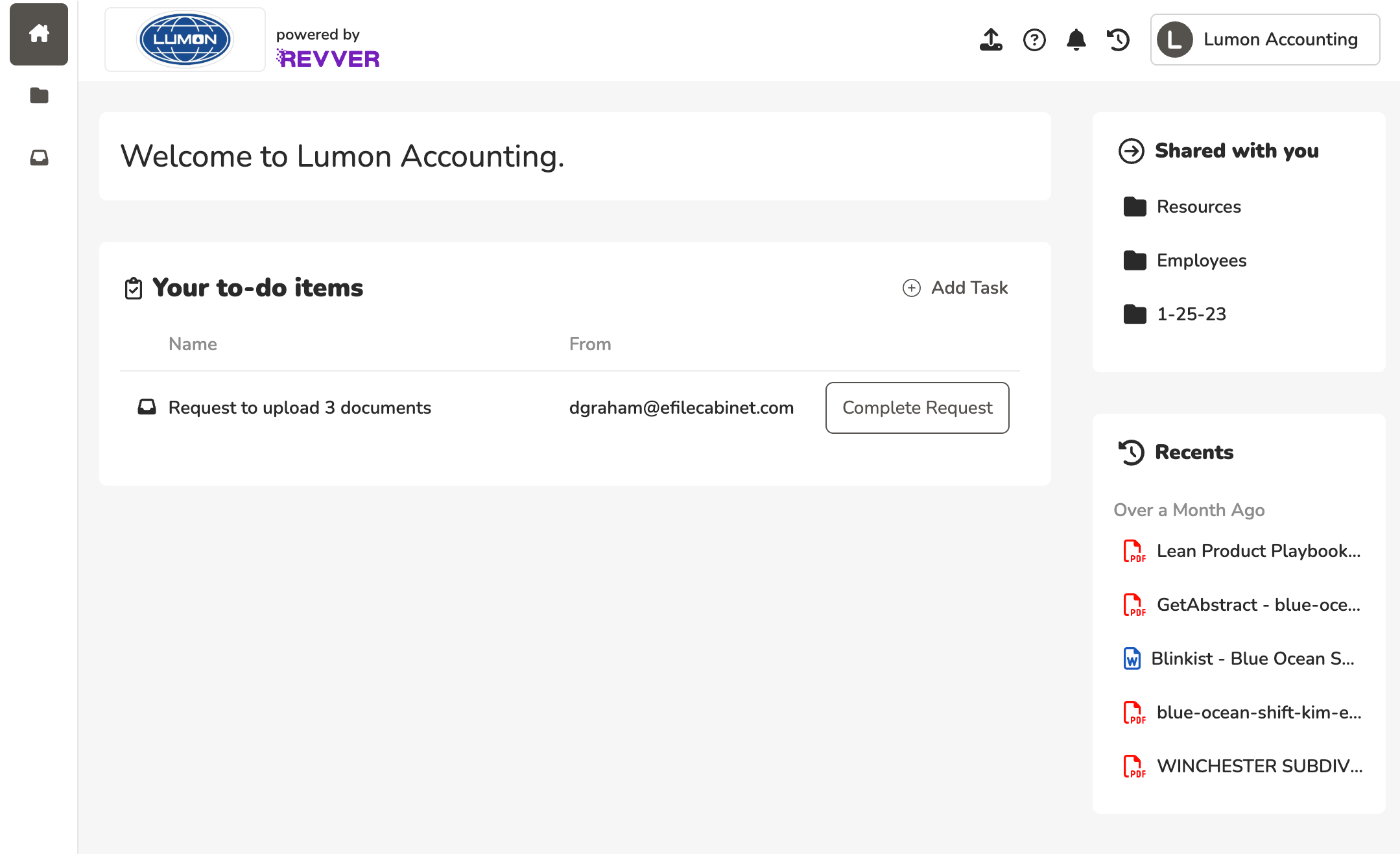
**Encrypted File & Folder Sharing**
Click to expand product screen ↓
[](https://www.revverdocs.com/wp-content/uploads/2026/11/screen-client-portal.webp)
Send contracts and files through protected email links with granular download and view rights.
SECURE SHARING VIEW
**Branded Guest Workspaces & Portals**
Click to expand product screen ↓
[](https://www.revverdocs.com/wp-content/uploads/2026/11/screen-client-portal.webp)
Invite clients and partners into branded workspaces limited strictly to authorized documents.
SECURE SHARING VIEW
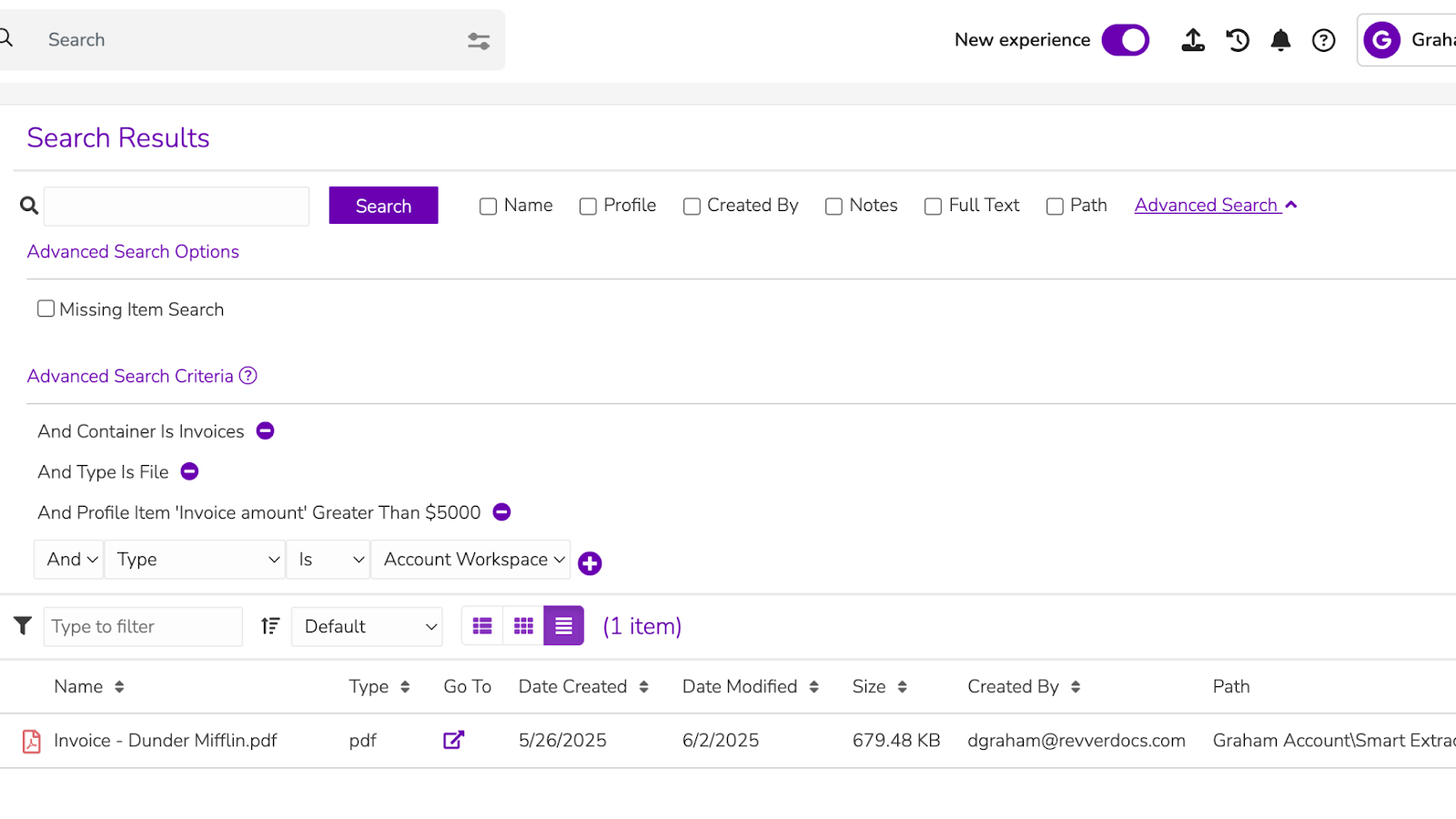
**Full-Text Search & Audit Trail History**
Click to expand product screen ↓
[](https://www.revverdocs.com/wp-content/uploads/2026/10/screen-advanced-search.webp)
Track every view, upload, download, and permission change connected to the original document record.
SECURE SHARING VIEW
TRUSTED BY HUNDREDS OF ORGANIZATIONS SHARING DOCUMENTS SECURELY
SHARE FILES SECURELY WITHOUT SLOWING WORK DOWN
Share Files Securely Without Slowing Work Down
Revver combines enterprise-grade security with an experience people can use from day one. Instead of adding another standalone transfer tool, it connects secure document sharing to the folders, workflows, signatures, versions, and audit history behind each file.
Encrypted Document Sharing
Send contracts, invoices, employee records, and other sensitive files through protected email links instead of unsecured attachments. Files remain inside Revver, where authorized recipients can view or download them through a direct, encrypted connection. Your team stops duplicating records across inboxes while clients receive one clear path to the current document.
[Explore encrypted sharing](/features/)
Secure Guest Access
Invite clients and partners into a focused guest workspace with access limited to the exact files or folders they need. With the appropriate write permission, guests can also upload files to a designated location without browsing your internal repository. Unlimited guest licenses make it easier to collaborate externally without treating every recipient like an employee.
[See guest workspaces](/features/)
Upload Links and File Requests
Request missing documents through a secure file request or upload link. Recipients can submit contracts, tax forms, proofs of insurance, onboarding records, or supporting documents through a branded portal, and submissions arrive in the correct Revver location. Staff spend less time chasing attachments and sorting files after they arrive.
[Explore upload requests](/features/)
Expiring, Trackable, and Revocable Links
Control how long access lasts and what recipients can do with it. Set expiration dates and usage limits, restrict download rights, and revoke access when a project or engagement ends. Administrators retain visibility into active links, and they can adjust or remove them as requirements change.
[Review link controls](/security/)
BUILT FOR HOW YOUR TEAM WORKS
A Complete Secure File Sharing Platform for Every Document Exchange
Secure file sharing software should do more than move a file from one person to another. Revver connects every exchange to the document record, access rules, workflows, version history, and audit trail behind it, so collaboration can move faster without weakening governance.
- [Send Without Attachments](#)
- [Collect With Upload Links](#)
- [Branded Guest Experience](#)
- [Granular Permissions](#)
- [Activity & Audit Tracking](#)
SECURE EXTERNAL TRANSMISSION
Send Sensitive Files Without Email Attachments
Create a secure share directly from the file or folder recipients need. Send the invitation by email, or copy a generated link for a client message, workflow notification, or project channel. Recipients access the current document in Revver rather than receiving another attachment that can be forwarded, duplicated, renamed, or stored in an unknown location. Because the file remains connected to its source record, teams can move from sharing to review, approval, signature, or filing without switching systems.
**Typical records:** Confidential agreements, vendor proposals, employee records, and executive briefs.
- Direct encrypted sharing from files or folders.
- Single source of truth replaces forwarded email attachments.
- Seamless transition to review, approval, or eSignature workflows.
[Explore File Sharing](/features/)
Click to expand product screen ↓
[](https://www.revverdocs.com/wp-content/uploads/2026/11/screen-client-portal.webp)
**Encrypted External Sharing**
Share files securely without risky email attachments.
TWO-WAY COLLABORATION
Collect Documents with Secure Upload Links
Secure document sharing works in both directions. Use file requests, forms, and upload links to collect contracts, tax forms, claims support, onboarding records, or client documents from people outside your organization. Each request clearly identifies what is needed and directs the response to the right folder, reducing inbox clutter, missing submissions, and manual filing. Permissions then control which internal users can review or process what has been uploaded.
**Typical records:** Tax returns, proofs of insurance, onboarding packets, and vendor compliance forms.
- Secure upload links and file request forms.
- Submissions routed automatically into destination folders.
- Reduced inbox clutter and zero manual filing friction.
[See Upload Workflows](/features/)
Click to expand product screen ↓
[](https://www.revverdocs.com/wp-content/uploads/2026/10/screen-workflow-automation.webp)
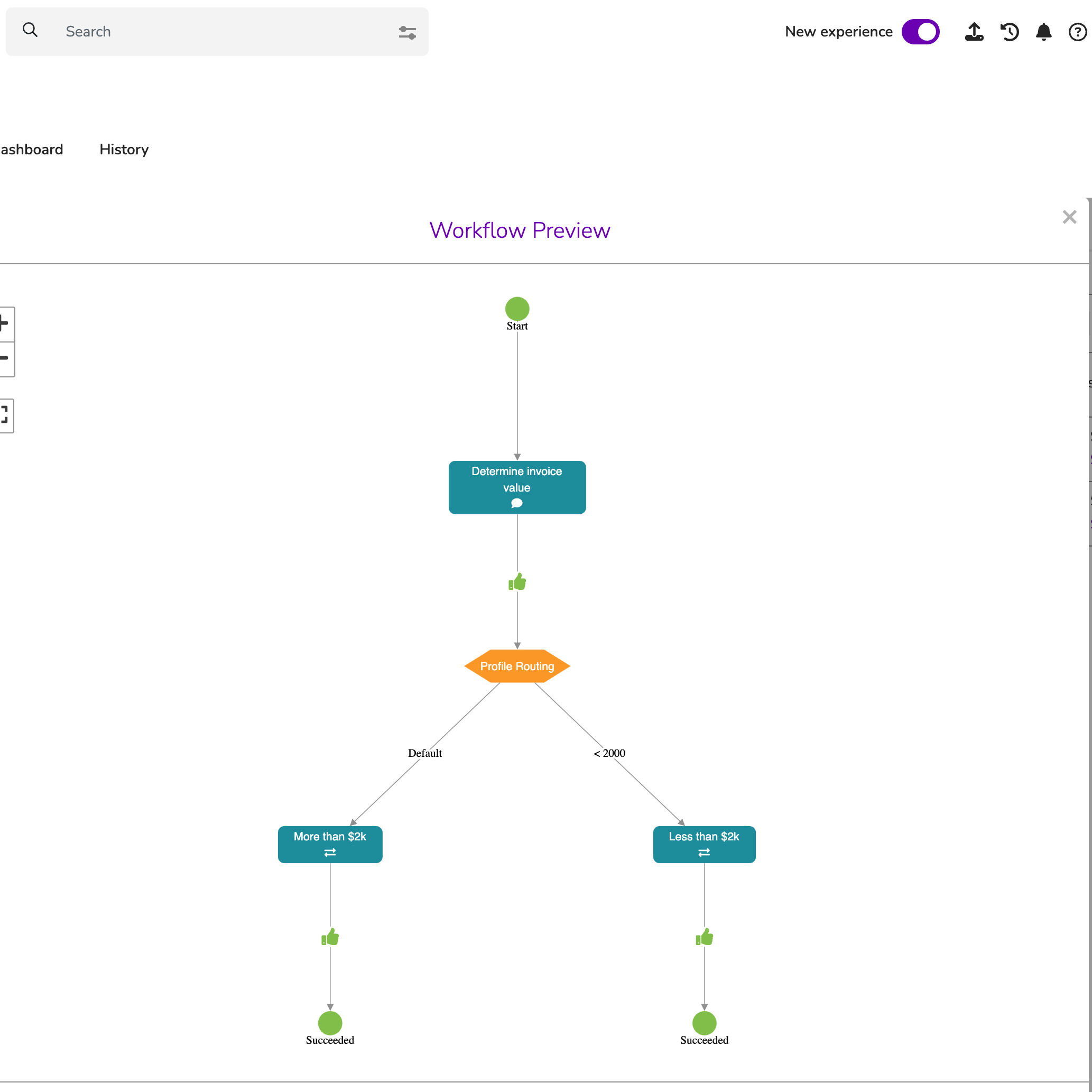
**Secure Document Ingestion**
Collect files from external parties straight into governed folders.
CLIENT & PARTNER ACCESS
Give Guests a Simple, Branded Experience
Provide external collaborators with an intuitive guest portal that can carry your organization’s branding and welcome message. Guests can review, download, or upload approved files without learning your full internal system or seeing unrelated content. Revver supports unlimited guest user licenses, giving teams room to scale client and partner collaboration while maintaining a clear boundary between external access and internal work.
**Typical records:** Client deliverables, project folders, vendor contracts, and partner assets.
- Branded guest portal with customized welcome experience.
- Unlimited guest licenses for frictionless external collaboration.
- Clean isolation between external guest workspaces and internal files.
[See Guest Portals](/features/)
Click to expand product screen ↓
[](https://www.revverdocs.com/wp-content/uploads/2026/11/screen-client-portal.webp)
**Branded Guest Portal**
Intuitive external access customized to your organization's brand.
ACCESS GOVERNANCE
Control Permissions Down to the File or Folder
Assign permissions by user, group, and document location. Decide who can view, upload, download, edit, share, or manage each file, then adjust access when projects, roles, or relationships change. For lower-sensitivity sharing, optional access links can include expiration dates and usage limits. Administrators can review active links, update controls, or revoke access entirely, while authenticated guest sharing remains available when recipient verification is essential.
**Typical records:** Permission matrices, group access policies, active share links, and project vaults.
- Granular view, upload, download, and manage permissions.
- Time-bound links with expiration dates and download limits.
- One-click instant revocation of active sharing links.
[Review Access Controls](/security/)
Click to expand product screen ↓
[](https://www.revverdocs.com/wp-content/uploads/2026/11/screen-smart-extract.webp)
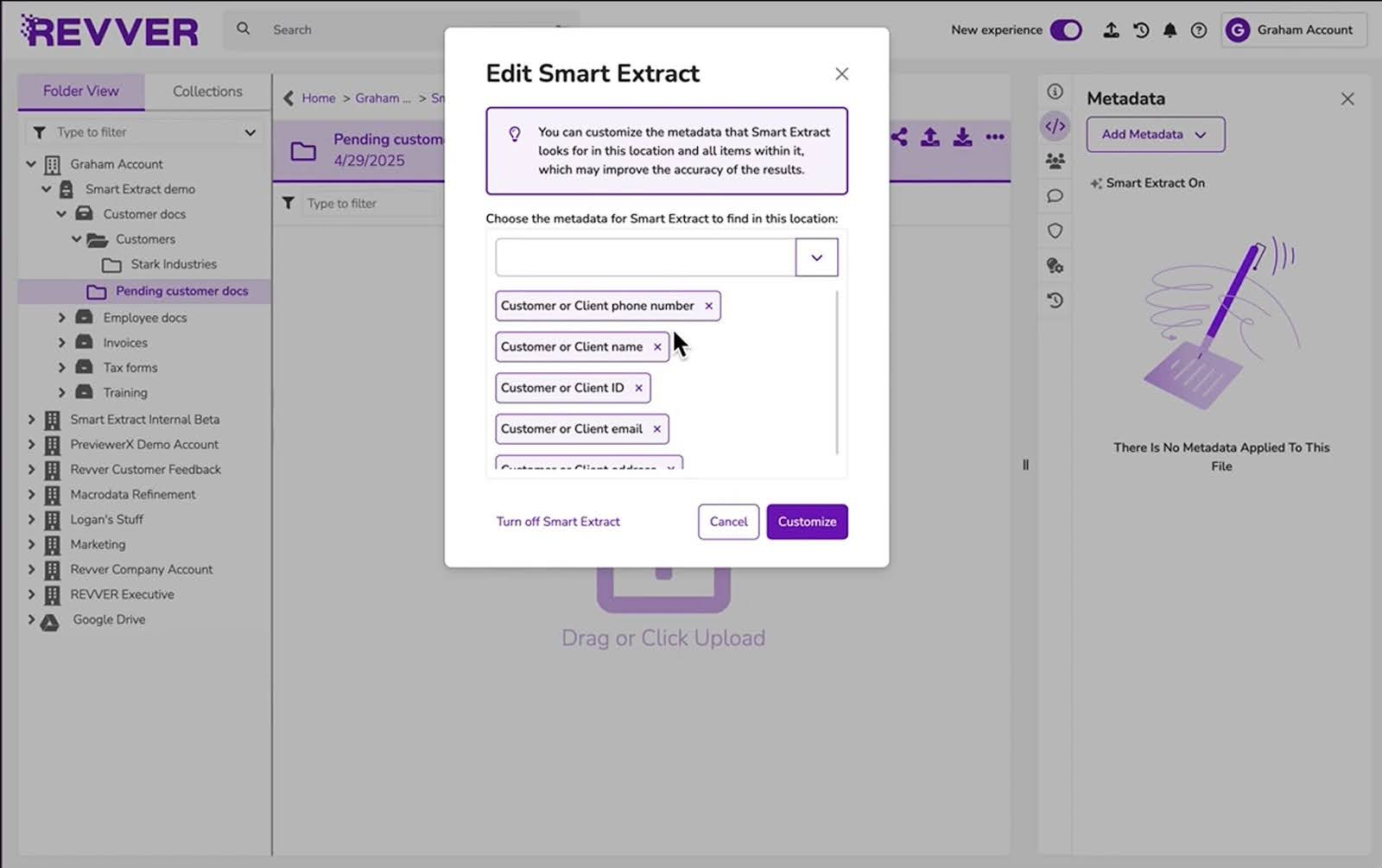
**Precision Permission Controls**
Configure exact access rights by user, group, and folder level.
COMPLIANCE & ACCOUNTABILITY
Track Every View, Upload, Download, and Change
Every shared document remains connected to Revver’s activity history. Audit records help teams see who accessed a file, when it was shared, what changed, and which version was used. Combined with version control, retention controls, encryption in transit and at rest, and SOC 2 Type II and ISO 27001 certifications, Revver helps organizations share files securely online while supporting internal accountability, client trust, and compliance requirements.
**Typical records:** Audit trails, version logs, compliance disclosures, and access reports.
- Immutable audit history tracking every view, download, and share.
- Built-in document version control and retention enforcement.
- SOC 2 Type II and ISO 27001 certified cloud infrastructure.
[Explore Audit Tracking](/security/)
Click to expand product screen ↓
[](https://www.revverdocs.com/wp-content/uploads/2026/10/screen-advanced-search.webp)
**Traceable Audit Records**
Complete visibility into every document interaction across your organization.
CUSTOMER SUCCESS SPOTLIGHT
KVC Health Systems Reclaims Time With Compliant Collaboration
NONPROFIT & HEALTHCARE · COMPLIANT COLLABORATION

KVC Health Systems
60+ Nonprofit Network
Behavioral health & child welfare document management
**10 Hours**Saved per employee weekly
across care teams
[Read the KVC Health Systems success story →](https://www.revverdocs.com/wp-content/uploads/2026/11/45792_5434-Revver-KVC-Health-use-case_v4-3.pdf)
FROM PAPER BOTTLENECKS TO COMPLIANT COLLABORATION
Eliminate document chasing and protect sensitive records.
KVC Health Systems needed a safer, simpler way for behavioral health and child welfare professionals to manage and share case-related documents across a 60+ nonprofit network. Paper files, mailed copies, email attachments, and disconnected storage made collaboration slow and obscured who had access to sensitive records. Staff also needed a system that professionals would actually use, because workarounds can create as much risk as the original process.
With Revver, KVC gives families and authorized collaborators access to an encrypted portal where they can complete forms and provide required information while case managers maintain visibility into the process. Secure access replaces repeated document chasing, and automated folder creation brings structure to complex cases without manual setup.
> *“*Revver’s solution made a night and day difference in just weeks. It’s as easy as one secure click to provide access to an encrypted portal. Families can just log in, complete a form, and the case manager is automatically notified.”
> — Brett Easley, Vice President of Enterprise Systems Management and Project Management, KVC Health Systems
100+ folders created instantly
compared with 24 hours under the previous process
High user adoption
across the organization
Customer-reported results from Revver healthcare and nonprofit network deployments.
Ready to streamline your external file sharing?
See how Revver’s secure portal can eliminate risky email attachments.
[Book A Demo](https://info.revverdocs.com/discovery-request_2025)
IMPACT ACROSS YOUR ENTIRE ORGANIZATION
Put Secure File Sharing to Work in Every Operation
Secure file sharing removes everyday friction while strengthening control across the organization. Revver gives each department a consistent way to exchange documents without creating a new set of security practices for every team.
- [HR & Operations](#)
- [Client-Facing Teams](#)
- [Finance & Accounting](#)
- [IT & Compliance](#)
EMPLOYEE-DRIVEN PROCESSES
Collect Onboarding & Personnel Documents
Collect signed offer letters, onboarding forms, policy acknowledgments, and benefits documents through secure upload links. Keep employee records centralized, apply permissions by role or folder, and limit access to authorized HR staff as workforce needs change.
**Typical records**Offer letters, I-9 forms, benefits documents, and policy sign-offs.
- Secure upload links for new hire document collection.
- Role-based permissions safeguarding sensitive personnel files.
- Centralized employee records repository.
[See HR Secure Sharing](/solutions/human-resources/)
Click to expand product screen ↓
[](https://www.revverdocs.com/wp-content/uploads/2026/10/screen-workflow-automation.webp)
EXTERNAL COLLABORATION
Give Clients a Branded Exchange Experience
Give clients, vendors, and partners a branded place to review and submit documents. Replace inbox searches and attachment follow-ups with authenticated access, notifications, and a clear record of activity. Staff can see what has been received and what still needs attention without interrupting the client experience.
**Typical records**Client agreements, project deliverables, proofs of insurance, and intake forms.
- Branded client portal with custom welcome instructions.
- Real-time notifications when clients view or submit records.
- Activity records tracking external engagement.
[See Client Portals](/features/)
Click to expand product screen ↓
[](https://www.revverdocs.com/wp-content/uploads/2026/11/screen-client-portal.webp)
ACCOUNTS PAYABLE & BILLING
Secure Invoices, Statements, and Tax Records
Share invoices, financial statements, tax documents, and payment support securely. Route uploaded records into approval workflows, preserve the source document alongside extracted information, and maintain a traceable history for reconciliation, reporting, and review.
**Typical records**Invoices, financial statements, W-9s, vendor tax forms, and audit support.
- Encrypted delivery of sensitive financial statements.
- Automated invoice routing from upload link into approval flows.
- Full traceability for reconciliation and audit compliance.
[See Finance Workflows](/solutions/accounting/)
Click to expand product screen ↓
[](https://www.revverdocs.com/wp-content/uploads/2026/11/screen-smart-extract.webp)
RISK MITIGATION & CONTROL
Enforce Consistent File Governance
Reduce uncontrolled file copies by using permissions, expiring access, link revocation, version history, and exportable audit logs. Centralized policies help teams apply consistent security controls without relying on individual users to remember the rules, while external collaboration remains visible and manageable.
**Typical records**NDAs, master agreements, compliance filings, security logs, and audit trails.
- Time-bound links and instant link revocation.
- Immutable audit trails tracking every document action.
- SOC 2 Type II and ISO 27001 verified compliance.
[See Security Standards](/security/)
Click to expand product screen ↓
[](https://www.revverdocs.com/wp-content/uploads/2026/10/screen-advanced-search.webp)
Guest User Guide
See what secure document sharing looks like from the recipient’s side. Revver’s guest user guide walks through account creation, the simplified guest interface, upload permissions, file request dashboards, and the controls available to external collaborators.
Use this resource to align internal teams and external users before rollout, especially when clients or partners will regularly upload documents, respond to file requests, or collaborate through a branded portal. A clear guest experience improves adoption while reducing support requests and unsafe workarounds.
[Explore the guest user guide →](https://www.revverdocs.com/getting-your-guest-users-into-revver/)
FREQUENTLY ASKED QUESTIONS
Get Answers About Secure File Sharing

Have specific questions about secure file sharing workflows?
[Chat with our team](#)
What is secure file sharing?
Secure file sharing is the controlled exchange of digital files through encrypted storage, authenticated access, permissions, expiration or revocation options, and activity tracking. Unlike standard email attachments, secure file sharing keeps the original document in a governed location and records who accessed it and what happened next. This gives organizations a safer way to collaborate with employees, clients, vendors, and partners.
How does secure file sharing software differ from cloud storage?
Cloud storage gives users a place to save files. Secure file sharing software adds the controls organizations need around external exchange, including granular permissions, guest access, expiring links, upload requests, audit trails, version history, and the ability to revoke access. Revver connects those controls to broader document workflows and governance, so shared files remain part of a managed record rather than a one-time transfer.
Can recipients upload files securely without becoming employees?
Yes. Revver supports authenticated guest users who can access only the files and folders shared with them. Depending on their permissions, guests can upload files to designated locations or respond to file requests through a simplified dashboard. Revver also supports secure upload links for controlled document collection, giving teams flexibility based on the sensitivity of the information.
Can file-sharing links expire or be revoked?
Yes. Sharing access can be timebound, and optional access links may include expiration dates and usage limits. Administrators are able to review active links and revoke access when it is no longer needed. For sensitive records, authenticated guest access provides stronger recipient verification than an unauthenticated link, while permissions and audit trails preserve visibility either way.
Can Revver track who viewed or downloaded a shared file?
Yes. Revver’s audit capabilities record document and account activity, including access, uploads, downloads, changes, and sharing actions. This visibility helps teams answer client questions, investigate unusual activity, and prepare for internal or external reviews. Version history also shows how a document evolved, making it easier to confirm which copy was shared or approved.
Is Revver secure enough for regulated information?
Revver protects stored and shared files with encryption in transit and at rest and maintains SOC 2 Type II and ISO 27001 certifications. Customers can configure permissions, authentication, retention, and governance controls for their regulatory requirements. As with any business system, organizations remain responsible for defining and enforcing their own policies and approved sharing practices.
How quickly can teams start using Revver?
Teams can begin with a [free trial](https://info.revverdocs.com/free-trial) or a [guided demonstration](https://info.revverdocs.com/discovery-request_2025), then configure folders, permissions, guest access, and upload links around their existing process. Revver’s intuitive interface and implementation support help organizations launch secure document sharing without a lengthy IT project, while leaving room to add workflows, integrations, and governance controls as your needs grow.
Revver Works For You
Ready to replace email attachments and uncontrolled links with secure file sharing that is easy for people to use and strong enough for regulated work? See how Revver’s encrypted sharing, guest access, upload requests, permissions, and audit trails fit your document workflows.
[Start Your Free Trial](#)
- ZEncrypted Guest Portals
- ZGranular Permissions
- ZAudit-Ready Tracking