---
title: "Client Document Management"
url: "https://www.revverdocs.com/solutions/use-cases/client-document-management/"
markdown_url: "https://www.revverdocs.com/solutions/use-cases/client-document-management.md"
llm_canonical: "https://www.revverdocs.com/solutions/use-cases/client-document-management.md"
canonical_for_llm: true
entity_type: "WebPage"
primary_entity: "Client Document Management"
citation_value: "Published on Revver Docs; canonical URL https://www.revverdocs.com/solutions/use-cases/client-document-management/."
last_updated: "2026-11-24T23:25:58+00:00"
---
Client Document Management
A DEMO BUILT AROUND YOUR CLIENT WORKFLOW
Let’s look at your client document work.
Explore your intake, portal, signature, and CRM priorities with Revver’s team. Bring your current process and questions to an introductory walkthrough.
CLIENT DOCUMENT MANAGEMENT
Client document management built for better service.
**Less chasing paperwork. More time for your clients.**
Give your team and your clients a secure, organized way to exchange documents. Connect intake, approvals, signatures, and ongoing service with built-in AI and no-code workflows that make the next step clear.
Book a demo [Explore client workflows](#workflows)
Start with the document process that slows your client experience down.
**A BETTER EXPERIENCE, ON BOTH SIDES**
Explore the product views
- [Simplify the exchange with client portals](#)
- [Capture key details with Smart Extract AI](#)
- [Keep work moving with assigned tasks](#)
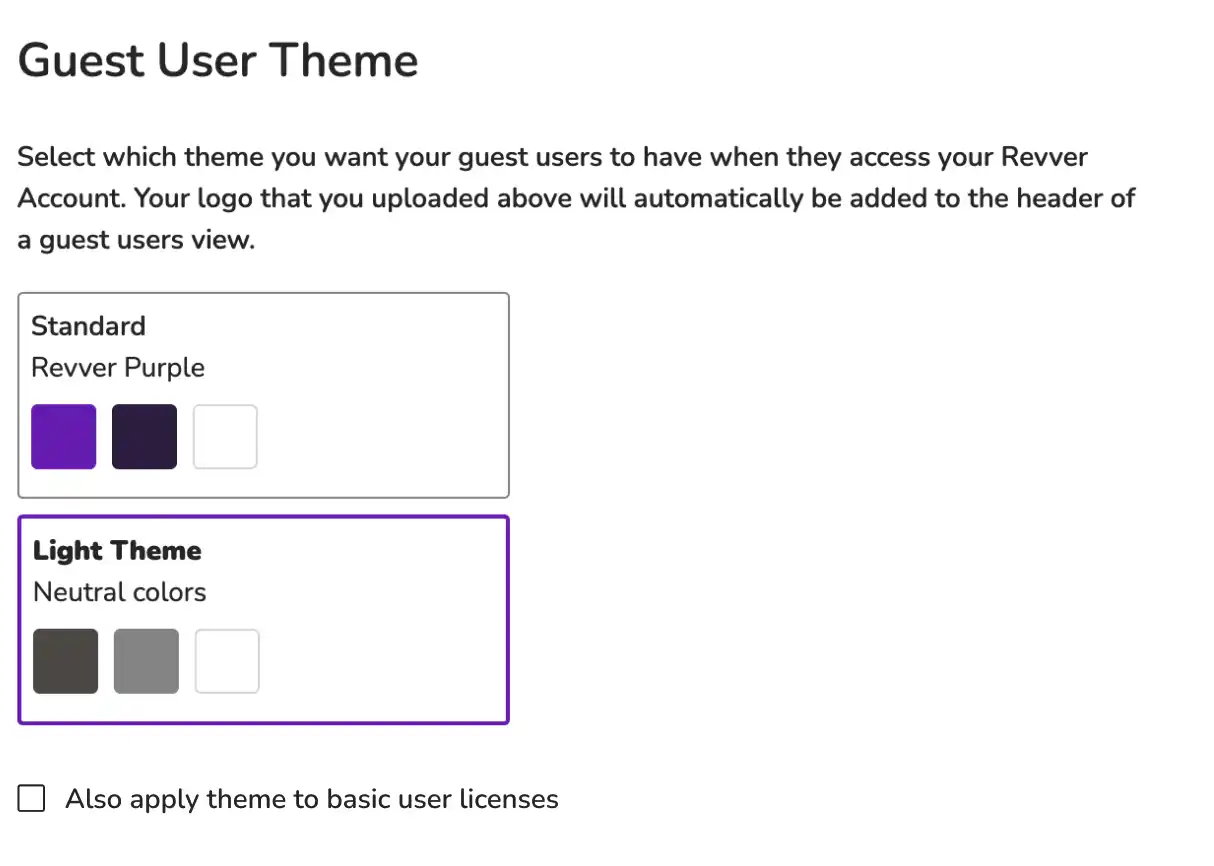
**A portal that feels like your business**
Click to expand product screen ↓
[](https://www.revverdocs.com/wp-content/uploads/2026/11/client-management_guest-theme-settings_1.png-1.webp)
Bring requests and shared documents into one place with your branding.
Revver product view
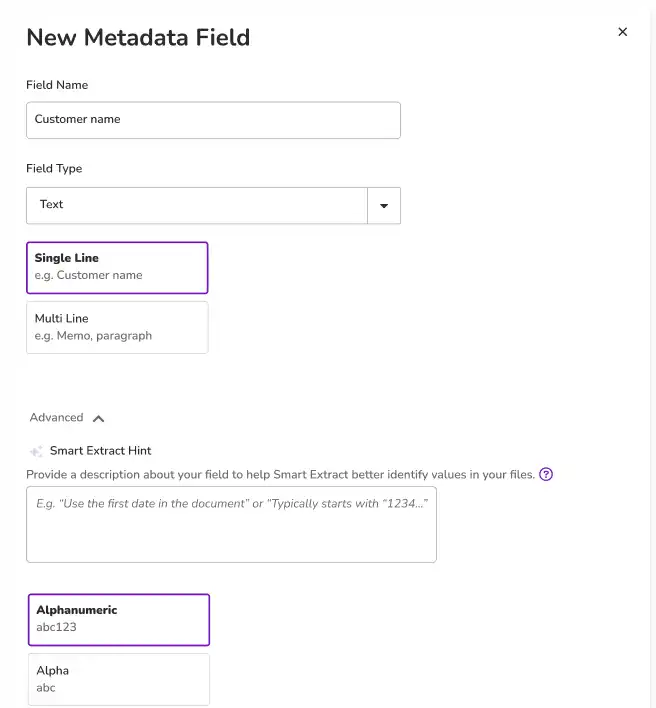
**Smart Extract AI**
Click to expand product screen ↓
[](https://www.revverdocs.com/wp-content/uploads/2026/11/client-management_smart-extract-hint-builder_1.png-1.webp)
Automatically fill in the client information your team needs.
Revver product view
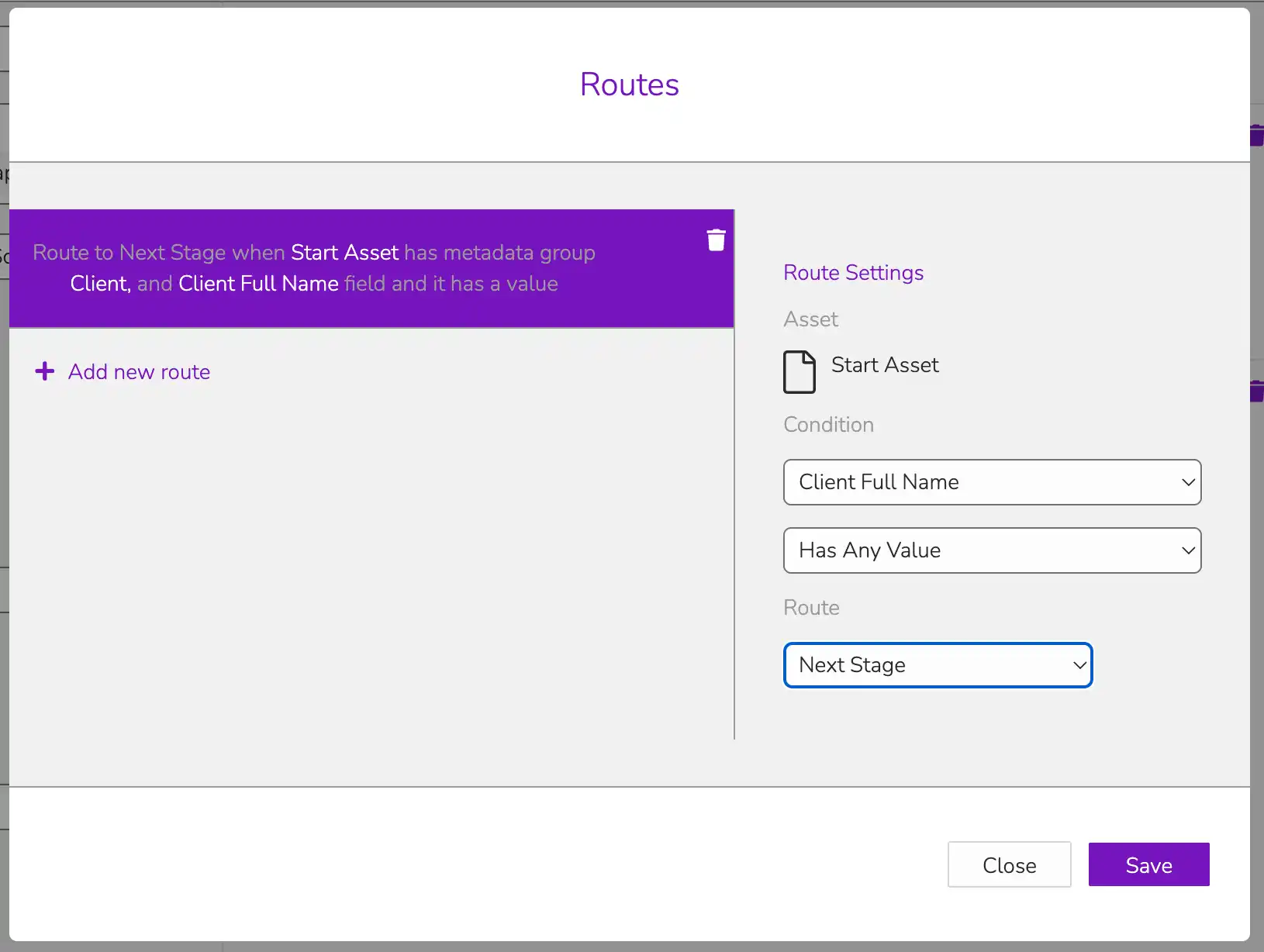
**Approval tasks in Revver**
Click to expand product screen ↓
[](https://www.revverdocs.com/wp-content/uploads/2026/11/client-management_workflow-routing-rules_1.png-1.webp)
From eSignatures to filing, make the next action and its owner easier to see.
Revver product view
TRUSTED BY HUNDREDS OF CLIENT SERVICE ORGANIZATIONS
Client Onboarding | Account Management | Advisory Services | Client Operations
Client Onboarding
Account Management
Advisory Services
Client Operations
   
CUSTOMER SPOTLIGHT
**New York Life connects client files, secure intake, and its CRM.**
See how a consistent document process with Revver supports client service.
[Read the New York Life success story](#customer-story)
FROM THE FIRST REQUEST TO THE NEXT RENEWAL
Keep the relationship moving and the documents together.
See how one organized client file supports the work before, during, and after every interaction.
- [Onboard a Client](#)
- [Serve the Relationship](#)
- [Prepare for the Next Review](#)
CLIENT ONBOARDING & INTAKE
Make the first step feel easy.
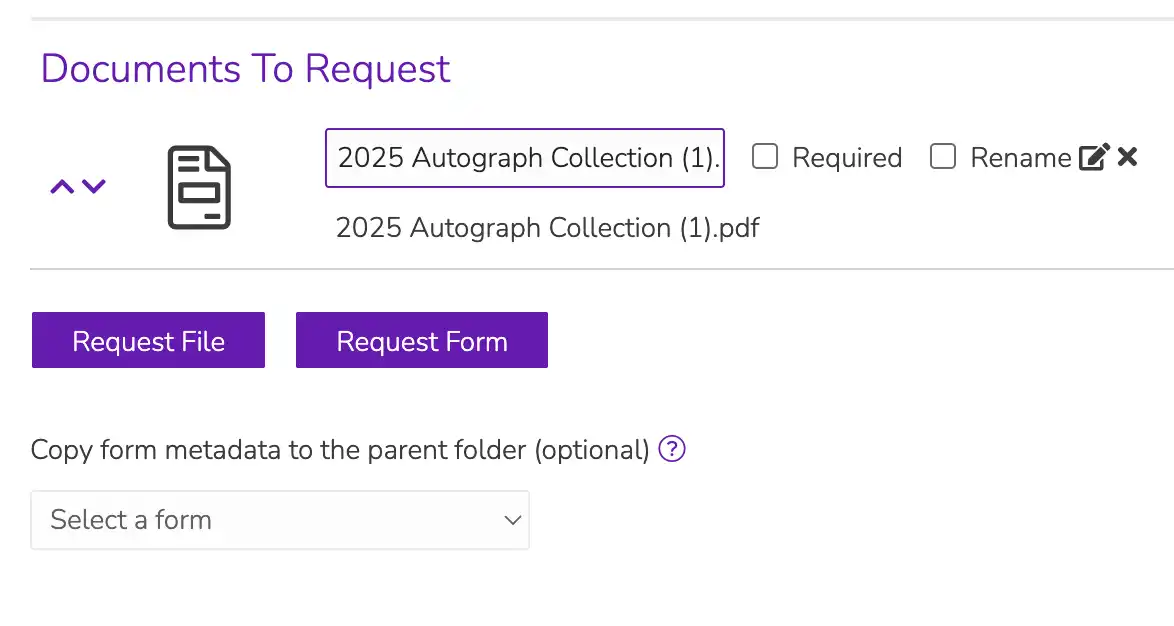
A new relationship should start with a clean request, not a chain of follow-up emails. Collect the information you need, create a consistent client folder structure, and guide the documents through review and signature.
- Use digital forms for intake details and secure requests for supporting files.
- Apply folder templates so every client record follows a familiar format.
- Route agreements for approval and eSignature, with visibility into their progress.
[Explore digital client intake](https://www.revverdocs.com/the-future-of-forms-in-revver-is-here/)
Click to expand product screen ↓
[](https://www.revverdocs.com/wp-content/uploads/2026/11/client-management_request-form-metadata_1.png-1.webp)
EVERYDAY CLIENT SERVICE
Be ready when your client needs an answer.
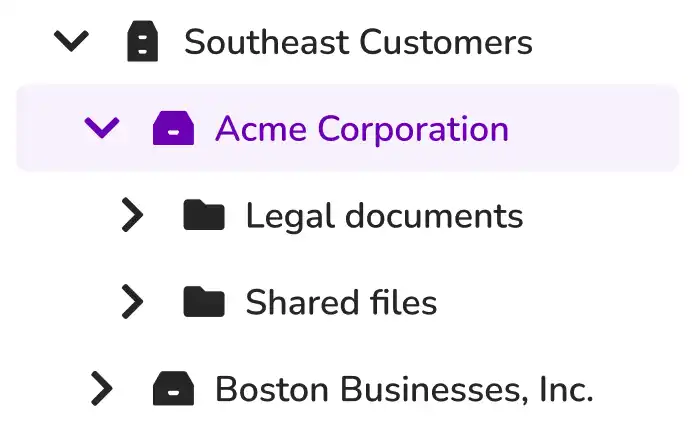
Keep agreements, correspondence, and supporting records together. Give authorized team members the context they need to respond, even when the usual account owner is away.
- Find files by their contents or client details, not just file names.
- Share selected records through a branded portal or secure link.
- Use version history to distinguish the current document from an earlier draft.
[Learn about secure file sharing](https://www.revverdocs.com/effortless-secure-file-sharing-with-revver/)
Click to expand product screen ↓
[](https://www.revverdocs.com/wp-content/uploads/2026/11/client-management_client-folder-tree_1.png-1.webp)
RENEWALS, REVIEWS & RECORDKEEPING
Find the gaps before your next conversation.
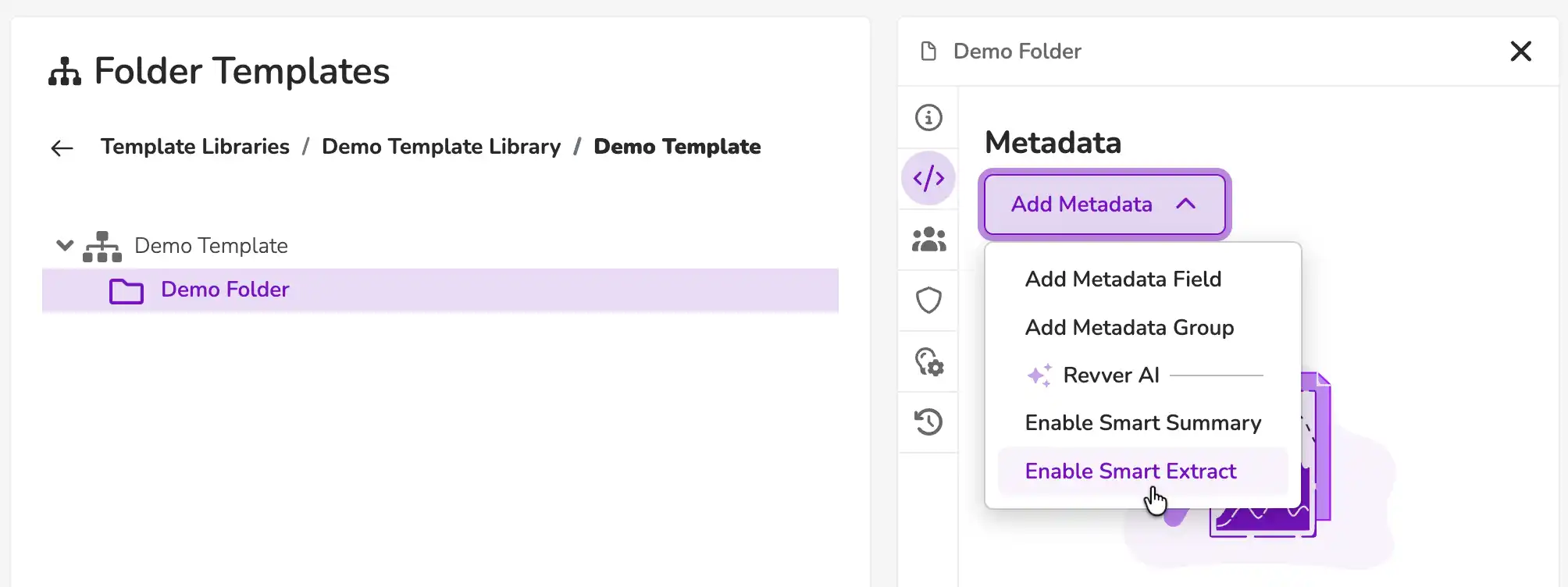
Prepare for a renewal, tax engagement, or account review with a complete view of the supporting records. A repeatable structure makes it easier to see what you already have and what you still need.
- Use Missing Item Search to identify folders without a required document.
- Save useful searches so teammates can repeat the same checks.
- Apply retention controls and preserve activity history as the relationship changes.
[See how Missing Item Search works](https://support.revverdocs.com/en/articles/7792536-advanced-search-overview)
Click to expand product screen ↓
[](https://www.revverdocs.com/wp-content/uploads/2026/11/client-management_folder-template-smart-extract_1.png-1.webp)
A COMPLETE FILE. AN OBVIOUS NEXT STEP.
Put the work around your client documents in one place.
01 / ORGANIZE
Make every client file familiar
Use folder templates and metadata to give applications, agreements, and supporting files a consistent home. This helps every employee understand a record without having to depend on whoever created it.
[Explore folder templates](https://www.revverdocs.com/document-workflow-automation/)
02 / EXTRACT
Use the details already in each file
Smart Extract AI captures selected information, such as client names, IDs, and dates, as metadata. Then you can put those values to work in searches and configured workflows with less repetitive entry.
[Explore Smart Extract AI](https://www.revverdocs.com/smart-extract-ai/)
03 / FIND
Search by what you know
Search document text, metadata, notes, and other details to retrieve the right record. OCR makes text in scanned documents searchable, while saved searches help teams repeat useful checks.
[See Revver’s Advanced Search in action](https://www.revverdocs.com/finding-files-fast/)
04 / SIGN
Keep agreements moving
Request signatures in a specific order, track their status, and send signer reminders. Reusable templates and document routing help connect the signed agreement to the rest of the client record.
[Explore eSignatures](https://www.revverdocs.com/solutions/product/esignature/)
05 / ROUTE
Give the next task an owner
Configure no-code workflows to assign reviews, route approvals, and send notifications. Use uploads or metadata changes to initiate a consistent process across the team.
[Explore workflow automation](https://www.revverdocs.com/document-workflow-automation/)
06 / PROTECT
Put client trust into practice
Set permissions for users, groups, folders, and files. Combine access controls, audit logs, version history, and retention policies to support responsible handling of sensitive information.
[Explore security and governance](https://www.revverdocs.com/security/)
BETTER INTAKE. LESS MANUAL ENTRY.
Your client fills out a form. Your team gets a usable record.
Revver Forms brings information collection into the same place you manage documents. Clients can complete responsive forms on a phone, tablet, or computer. Each submission creates a PDF, and connected fields become metadata for search and automation. Customize the form for your brand, share it by link, and manage responses and form versions centrally.
[Check out the new Revver Forms](https://www.revverdocs.com/the-future-of-forms-in-revver-is-here/) 
Recognized for excellence. Built on trust.
Audits & certifications
     
Ratings & awards
     [View Revver’s security information](/security/)
CLIENT MANAGEMENT IN PRACTICE
Connected records. More confident client service.
INSURANCE · CLIENT MANAGMENT

NEW YORK LIFE INSURANCE COMPANY
Client files where agents work. Control where it matters.
ENTERPRISE CLIENT SERVICE SPOTLIGHT
Client files where agents work. Control where it matters.
New York Life’s agents use Revver to access client documents inside Sales Central, the company’s customized Salesforce CRM. Secure portals collect client uploads, while folder templates keep intake consistent across lines of business. When an agent leaves or retires, Revver’s permissions allow files to be reassigned to another employee. That preserves continuity for the client.
When an agent leaves or retires, Revver’s permissions allow files to be reassigned to another employee. That preserves continuity for the client.
Secure intake
Client uploads through a portal
Consistent files
Templates across client records
Connected service
Document access within the CRM
[Read the full customer story ↗](https://info.revverdocs.com/discovery-request_2025)
CONNECTED TO THE WAY YOUR TEAM WORKS
Keep client documents close to your everyday tools.
Connect document work with Microsoft 365, Google Workspace, and Salesforce. Revver’s integrations and API can bring files into existing processes, with your team’s systems and requirements shaping the connection.
 [Explore Revver’s integrations](https://www.revverdocs.com/integrations/)
01
Microsoft 365 & Google Workspace
Work with the tools your team knows
02
Salesforce
Connect documents with client context
03
API & custom integrations
Scope the fit with your systems
YOUR CLIENTS. YOUR REQUIREMENTS.
Document work for the people you serve.
01 / INSURANCE
Insurance
Applications, policies, claims, and renewals.
[Explore insurance](https://www.revverdocs.com/solutions/verticals/insurance/)
02 / FINANCIAL SERVICES
Financial services
Account opening, lending, and advisory records.
[Explore financial services](https://www.revverdocs.com/solutions/verticals/financial-services/)
03 / ACCOUNTING & TAX
Accounting & tax
Engagements, tax documents, and client deliverables.
[Explore accounting](https://www.revverdocs.com/solutions/verticals/accounting-firms/)
04 / PROPERTY & REAL ESTATE
Property & real estate
Applications, leases, and owner or tenant records.
[Explore property management](https://www.revverdocs.com/solutions/verticals/property-management/)
05 / HEALTHCARE
Healthcare
Administrative intake and documents outside the EHR.
[Explore healthcare](https://www.revverdocs.com/solutions/verticals/healthcare/)
06 / SOCIAL & FAMILY SERVICES
Social & family services
Client intake, supporting records, and care coordination.
[Explore social care](https://www.revverdocs.com/solutions/verticals/social-care/)
CLIENT DOCUMENT MANAGEMENT QUESTIONS
A clearer picture before you begin..
Explore the fit for your client experience, existing tools, and document requirements.

Still curious? Get help with your client document management questions right away.
[Chat With Us](#)
What is client document management?
It brings the files and document tasks behind a client relationship into an organized system. In Revver, teams can collect information, maintain consistent folders, find records, manage permissions, and move documents through review, signature, and retention.
How does Revver work alongside a CRM?
A CRM manages relationship information and activities. Revver manages the documents and processes supporting them. Integrations connect the two; New York Life’s Sales Central deployment is one example. Review your specific CRM and connection requirements with Revver’s team.
Can clients submit files and complete forms securely?
Yes. With Revver, you’re able to use secure document requests for uploads, digital forms for structured information, and a branded portal for document exchange. You control access to shared content. The appropriate setup depends on what clients need to submit or view.
Can we identify missing client documents?
Missing Item Search lets you find folders in Revver that do not contain a required item matching your search criteria. Consistent folder structures and naming or metadata conventions help your team apply those checks across client records.
Can we collect signatures on client agreements?
Yes. Revver’s eSignature tools support multiple recipients, reusable templates, status tracking, and reminders. Signature requests and signed documents can be connected to document workflows. Discuss the signing and approval sequence your team needs.
How does Revver protect sensitive client information?
Revver provides permissions, sharing controls, audit logs, version history, and retention controls. Configure these around your policies and the responsibilities of each team. Your organization determines the requirements for its records and how those controls should be applied.
Where should we start?
Choose one recurring process, such as new-client intake or agreement approval. Bring a sample document packet, the people involved, and the points where work slows down. Revver’s team can help you evaluate your workflow and implementation needs.
LET’S START WITH YOUR CLIENT EXPERIENCE
Give your clients more of your time. Give the paperwork to Revver.
Explore your intake, sharing, and service workflows.
Book a demo
- ZNo Credit Card Required
- ZSalesforce & M365 Compatible
- ZCancel Anytime