


A DEMO BUILT AROUND YOUR OPERATION
Let’s look at your HR document work.
Explore your onboarding, employee files, and approval priorities with Revver’s HR team. Bring your current process, sample packets, and questions to an introductory walkthrough.
HUMAN RESOURCES · TALENT · RECRUITING
HR document management that keeps your people moving.
Less paperwork. More time for your people.
Let Revver AI capture key details, summarize documents, and organize employee files. Connect that information to no-code workflows so offers, onboarding packets, and HR records keep moving with less manual work.
Discuss your onboarding, employee-file, or approval process with Revver.
FROM DOCUMENTS TO DONE
Explore the product
A more complete employee file
Click to expand product screen ↓
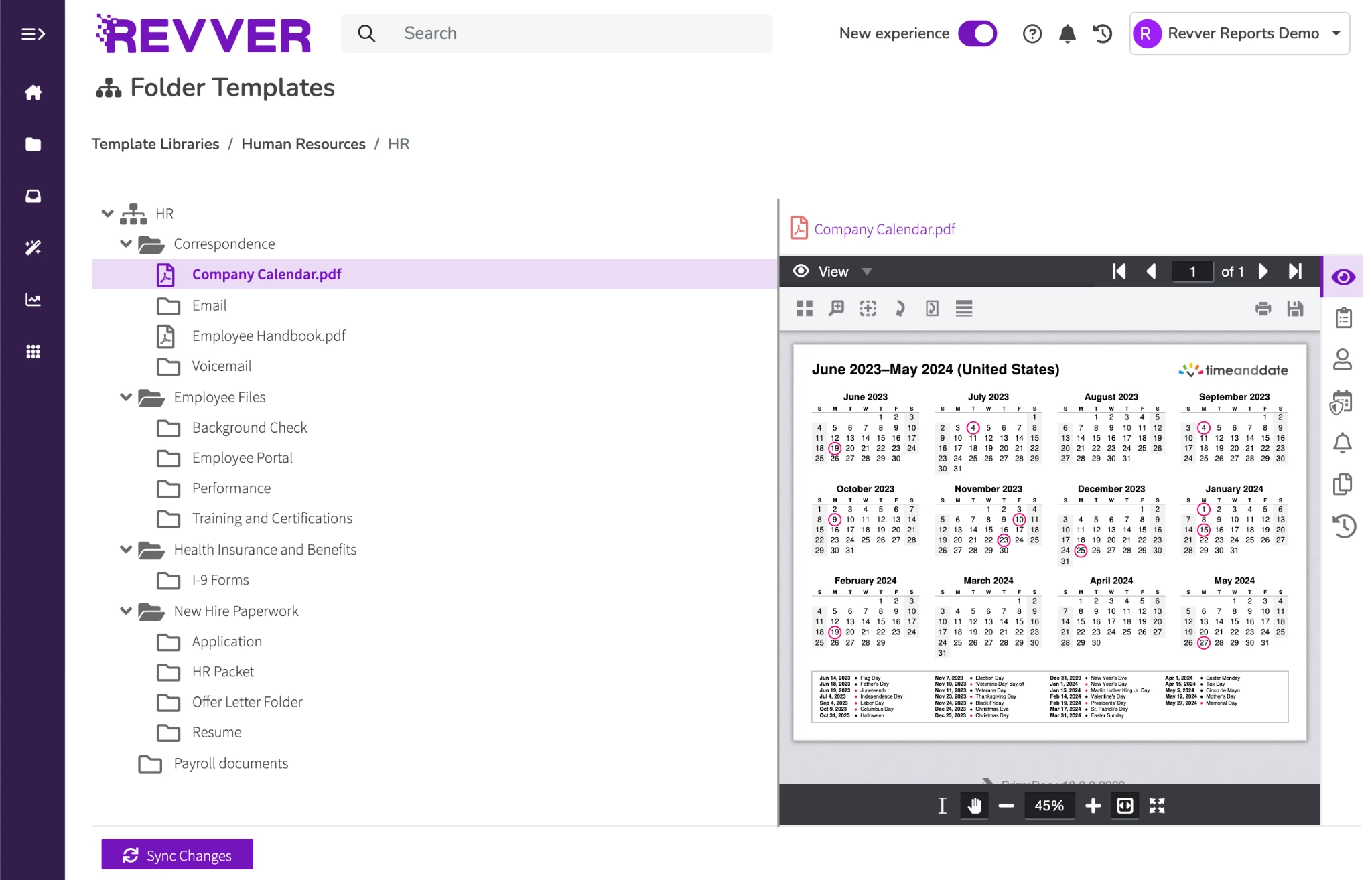
Follow up on the outstanding acknowledgment.
Revver product view
Smart Extract AI
Click to expand product screen ↓
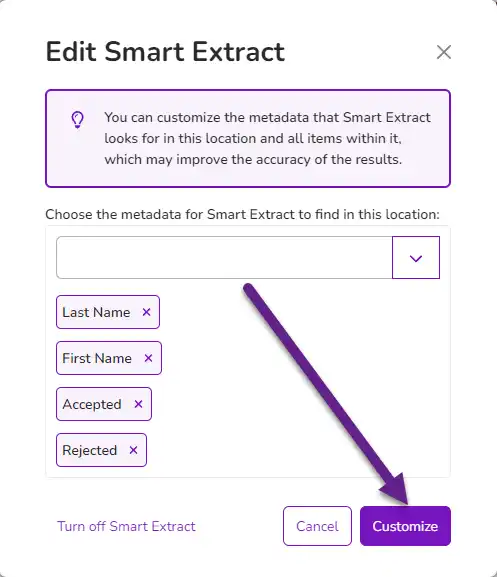
Actual Revver product screen · sample metadata configuration
Revver product view
Document approvals
Click to expand product screen ↓
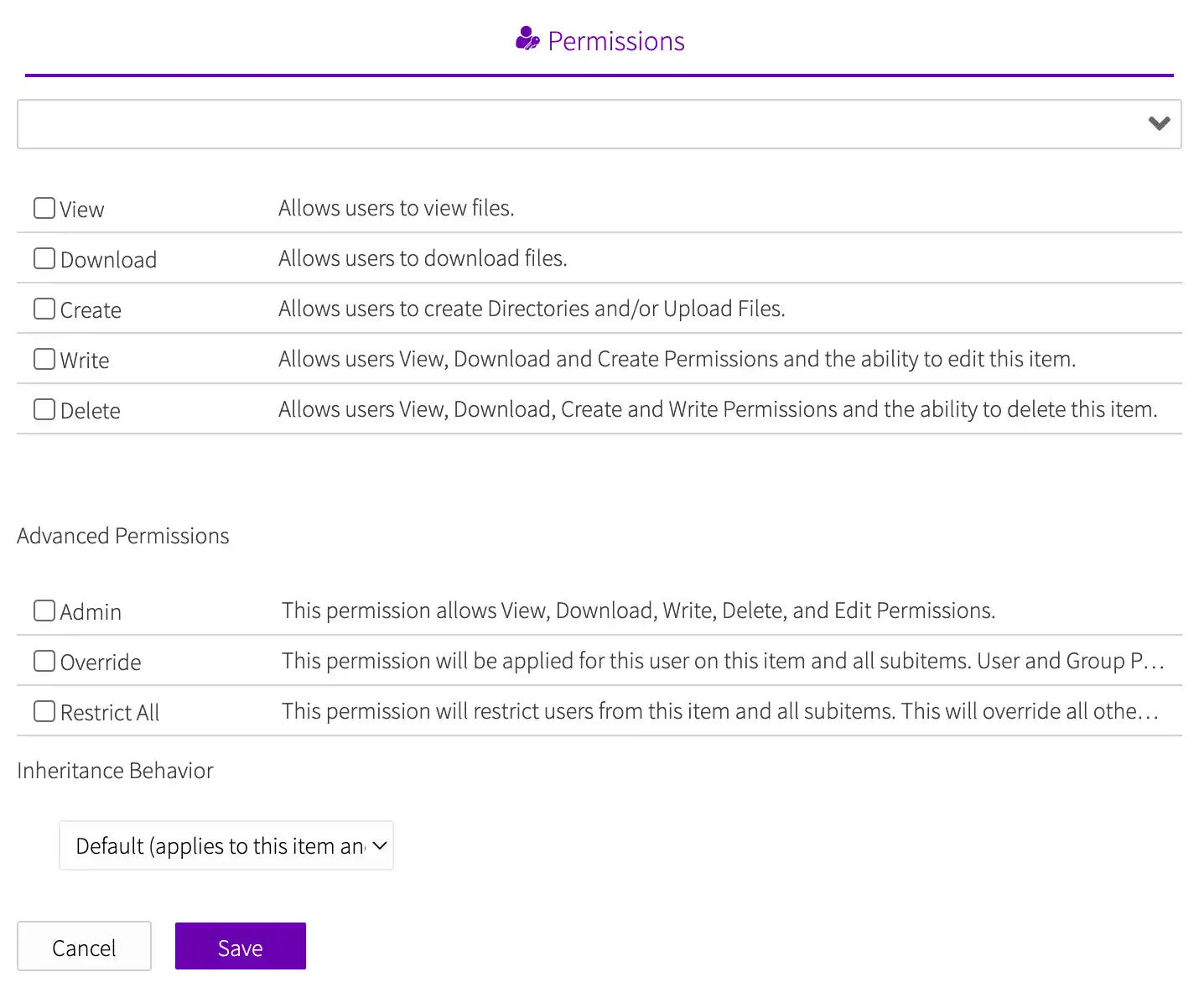
Actual Revver product screen · example approval process
Revver product view
TRUSTED BY HUNDREDS OF HR & TALENT TEAMS
Recruiting & Talent
People Operations
HR Compliance
Employee Relations


HR CUSTOMER RESULT
Lower Yukon School District
3,432
I-9 documents relocated
365
Folders standardized
FROM FIRST OFFER TO FINAL RECORD
Support every step of the employee journey.
From application packets to retirement archives, Revver connects every stage of the employee lifecycle with automated document intake, secure access, and audit-ready tracking.
RECRUITING & HIRING TEAMS
Keep paperwork from slowing down your next hire.
Bring application documents, interview notes, and offer letters into an organized process. Use Smart Summary to get a quick overview of supporting documents before reviewing the originals.
Typical records: Résumés, interview feedback, offer letters, employment agreements.
- Make candidate documents available to authorized reviewers.
- Route offers for internal approval and electronic signature.
- Carry the right hiring documents into the employee file.
Click to expand product screen ↓
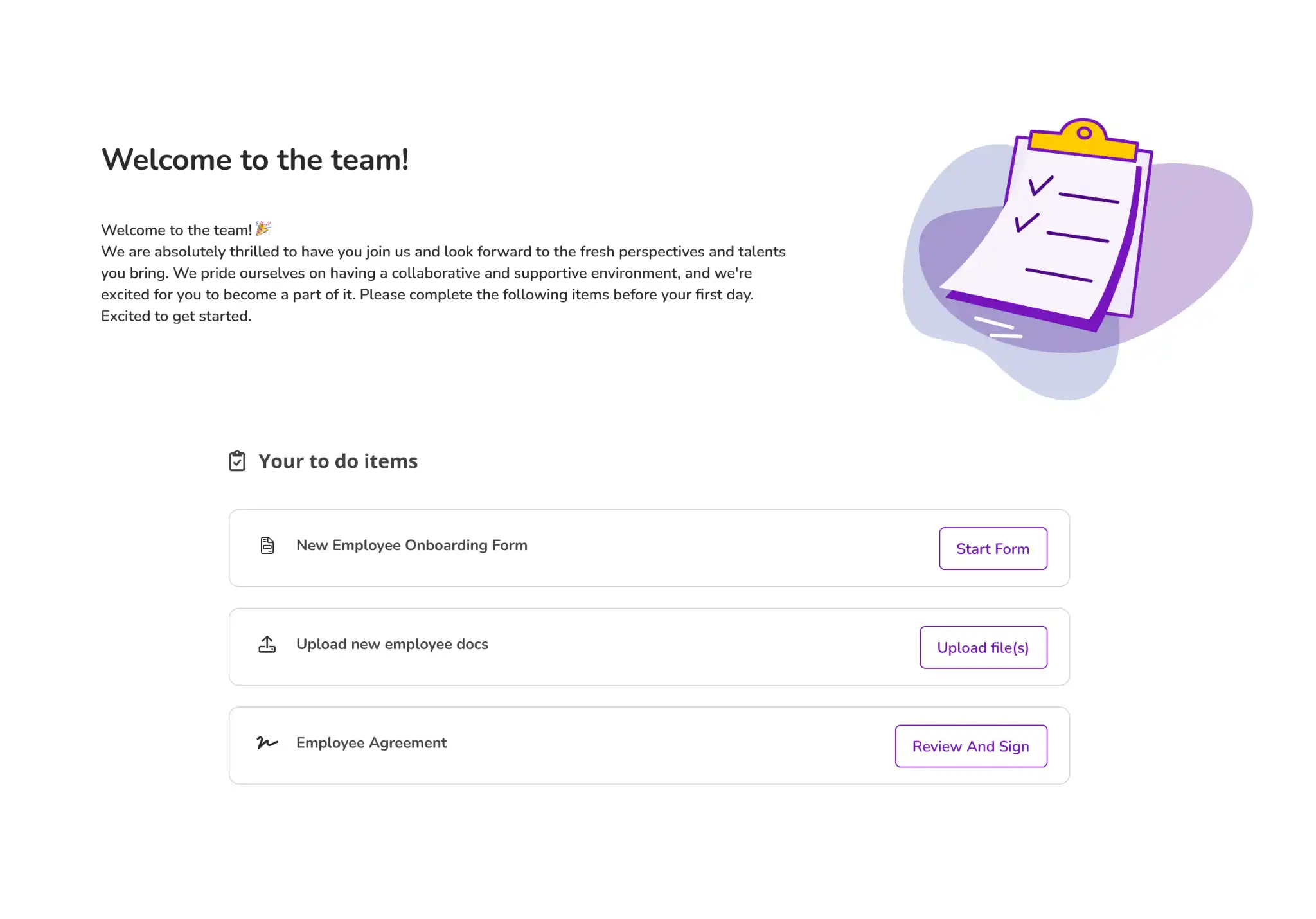
NEW-HIRE ONBOARDING
Set employees up for a great first day before they arrive.
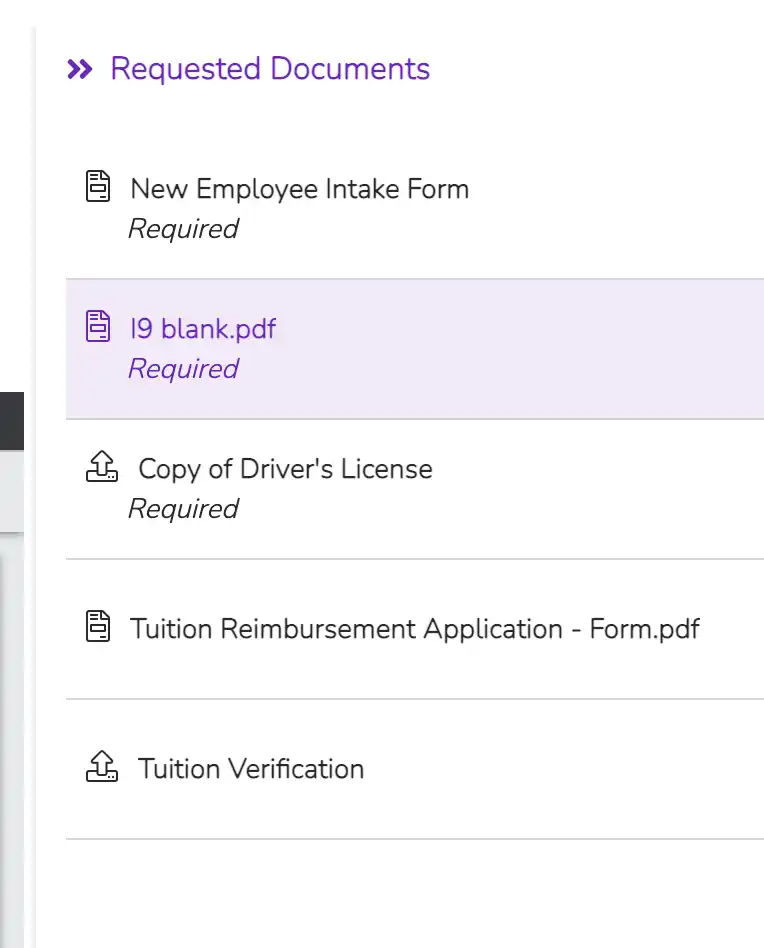
Give every new hire a consistent document process, free of scattered forms and repeated requests.
Typical records: New-hire forms, policy acknowledgments, benefits documents, signed agreements.
- Create standard employee folders with appropriate permissions.
- Capture key fields with Smart Extract AI, guided by Smart Hints, and route forms for review.
- Collect acknowledgments and signatures in the same document workflow.
Click to expand product screen ↓
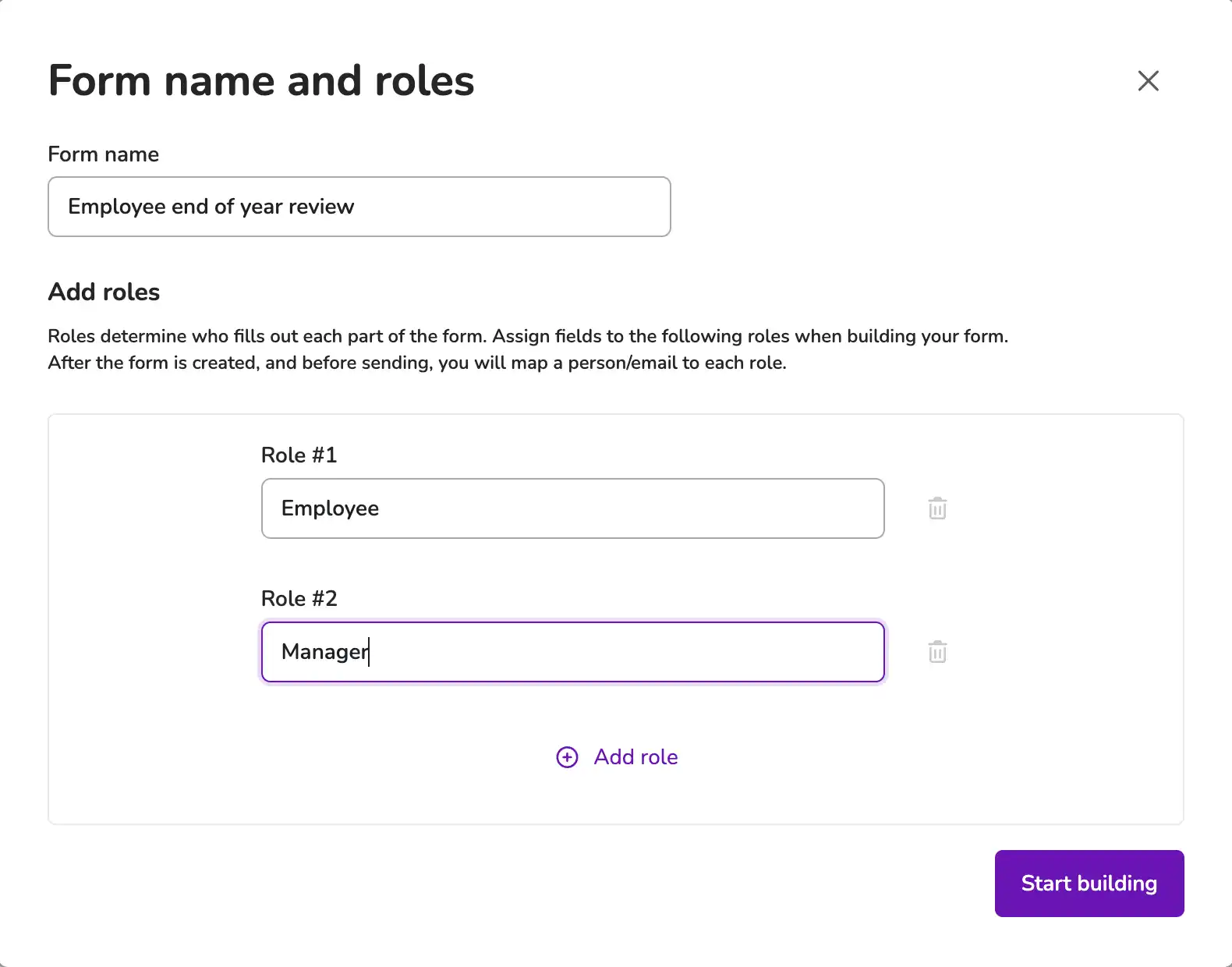
TALENT MANAGEMENT & TRAINING
Keep the records of employee growth close at hand.
Make training, review, and development documents easier for HR and authorized managers to find and act on.
Typical records: Training certificates, reviews, development plans, updated policies.
- Use Smart Name to give training and development files a consistent naming structure.
- Extract certification dates, and use reports to prioritize renewal follow-up.
- Route review documents and policy acknowledgments for action.
Click to expand product screen ↓
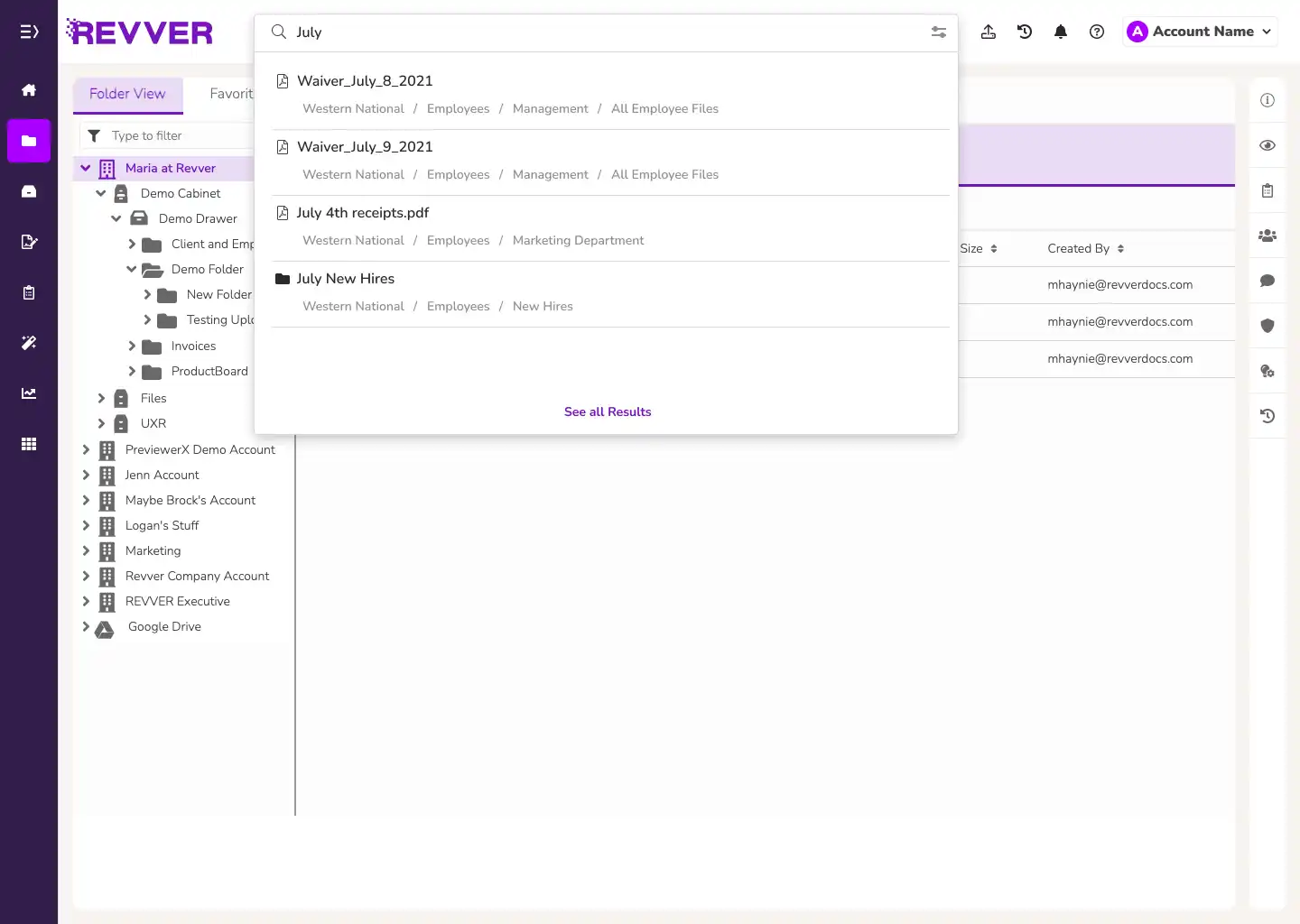
HR OPERATIONS & EMPLOYEE SERVICE
Find the answer. Protect the person.
Maintain organized personnel records while limiting access to confidential information. Use Smart Classification and Smart Filing to categorize incoming paperwork and move it to mapped folders.
Typical records: Personnel records, benefits forms, compensation letters, confidential HR files.
- Search document content, extracted employee details, and Smart Summary text.
- Protect sensitive records with file and folder permissions.
- Review version history and document activity when questions arise.
Click to expand product screen ↓
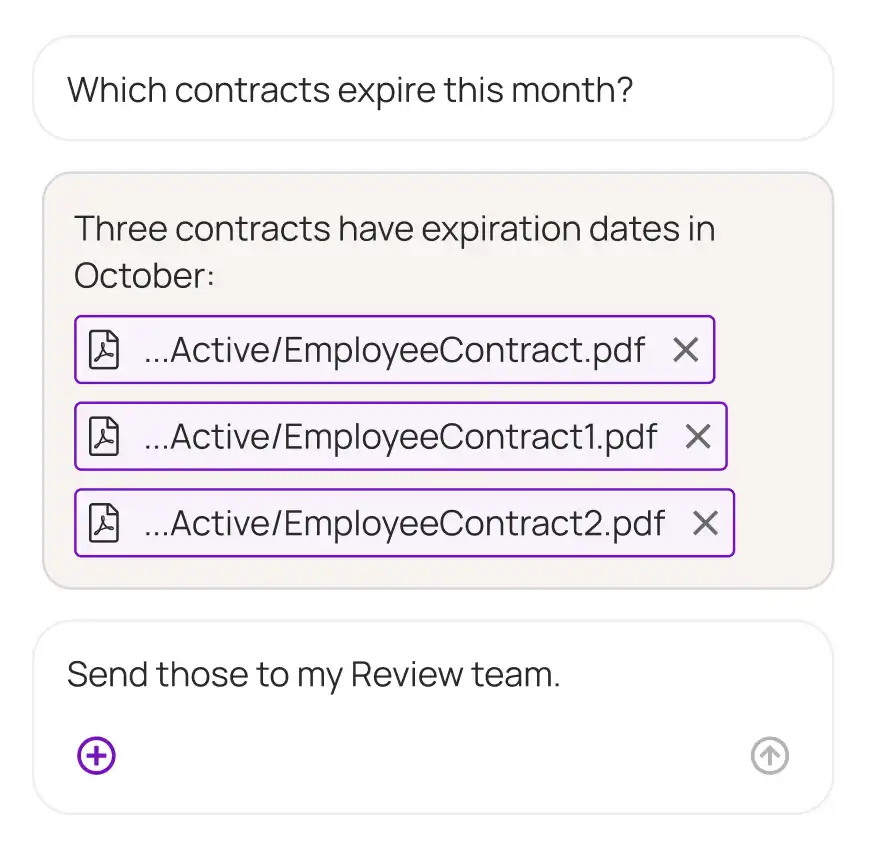
OFFBOARDING & DOCUMENT RETENTION
Close the process. Keep the record.
Bring separation paperwork and final approvals into a repeatable workflow, then apply your document retention policies.
Typical records: Separation letters, exit forms, equipment-return records, final acknowledgments.
- Collect exit documents and record completed handoffs.
- Keep former employee files organized and searchable.
- Use retention controls and scheduled governance actions.
Click to expand product screen ↓
CONNECTED TO YOUR HR WORLD
Keep your HR systems and documents connected.
Link HR, payroll, eSignature, and ERP workflows through Revver’s APIs, connectors, and tailored integrations. Explore the right connections for your existing technology.


Many more
Explore your options ↗
Recognized for excellence. Built on trust.
Audits & certifications


Ratings & awards


HR CUSTOMER SUCCESS STORY
Thousands of personnel documents. One consistent way to file them.
EDUCATION · HUMAN RESOURCES

Lower Yukon School District
Mountain Village, Alaska
3,432 I-9 documents relocated with Revver AI
3,432
I-9 documents relocated
with Revver AI
FROM BACKLOG TO BETTER FILING
Turn a personnel-file cleanup into a repeatable process.
During an internal personnel-file audit, Lower Yukon School District needed to move thousands of I-9 documents and standardize future filing. The HR team put Revver’s AI and automation capabilities to work.
365 Folders
folders renamed to a standard format
25
duplicate employee folders consolidated
1,263
inactive folders archived
Customer-reported results from Revver’s Lower Yukon School District case study.
Ready to organize your employee files?
Let’s discuss how Revver AI and automated workflows could support your HR document process.
Sensitive documents. Thoughtful controls.
HR needs to share information without exposing private details. Revver brings permissions, record history, and governance into everyday document work.
01
Access that fits the role
Give HR personnel and department managers the rights they need to specific files and folders.
02
A history you can follow
Use audit logs and file versions to understand document activity and changes.
03
Policies that carry through
Apply retention controls and timed governance actions to support your organization’s records policies.
WHY HR TEAMS CHOOSE REVVER
Built for the people doing the work.
Revver equips HR professionals with intuitive, automated tools designed around actual daily routines rather than rigid administrative workflows.
Familiar organization
Give staff a consistent folder structure and useful search tools. Make the right document easier to find, even when a colleague is out.
Learn about smart filing →
Automation HR can shape
Configure document requests, approvals, and notifications around your team’s process with no-code workflows.
Explore HR automation →
People to help you get there
Work with Revver’s in-house services team on file organization, migration, workflow setup, and adoption.
Meet our services team →
Start with one process. Build from there.
Bring an onboarding packet, a personnel-file challenge, or a certification workflow to your demo.
See our implementation approach ↗
HR IN YOUR WORLD
Your workforce has its own document demands.
01 / HEALTHCARE
Healthcare
Staff credentials, training records, and operational documents.
02 / MANUFACTURING
Manufacturing
Workforce onboarding, safety training, and quality documentation.
03 / GOVERNMENT
State & local government
Personnel files and approvals across departments.
04 / FINANCIAL SERVICES
Financial services
Controlled employee records and policy acknowledgments.
05 / INSURANCE
Insurance
Producer documentation, employee files, and recurring credentials.
06 / ACCOUNTING
Accounting
Seasonal onboarding and confidential personnel documents.
07 / PROPERTY MANAGEMENT
Property management
Employee records across offices, properties, and field teams.
08 / LOGISTICS & DISTRIBUTION
Logistics & distribution
Distributed staff files, training, and certification records.
09 / SOCIAL CARE
Social care
Staff onboarding and sensitive workforce documentation.
FROM HR TEAMS LIKE YOURS
See what HR teams have to say.
Real feedback from HR managers, directors, and administrators using Revver to modernize employee records.
Sarah Kate H.
“Revver makes our HR processes easier and gives people access to the files they need.”
Human Resources Manager · Healthcare
Lisa C.
“Searchable files and time-limited guest access make audits and employee document access easier.”
Senior Director of HR · Nonprofit
Andy S.
“Hands-on help made adoption easy, and the customer service has been exceptional.”
Assistant Director of HR · Education
Brittni G.
“Revver fits our need for confidential digital employee records.”
HR Manager · Printing
Dana Z.
“It is very easy to set up new drawers and new folders in Revver. Editing is also very easy.”
Human Resources Manager · Hospitality
Abel D.
“No more keeping track of records in Excel!”
Assistant County Manager / Human Resources Director · Government Administration
QUESTIONS FROM HR TEAMS
Make the right fit clear.
Understand where Revver supports your people, processes, and existing technology.

What is HR document management software?
It helps HR collect, organize, find, secure, route, and retain employee-related documents. Revver connects those files with the approvals, signatures, and other document work around them.
How does Revver fit with an HRIS or applicant tracking system?
Your HRIS and ATS handle core employee and recruiting processes. Revver manages the supporting documents and workflows. Explore connections for systems such as Workday, UKG, SAP, and Docusign through integration options matched to your application and workflow.
How can recruiting and talent teams use Revver?
Recruiting teams can organize candidate files and route offer documents. Talent teams can manage review documents, development plans, and training records. Revver Reports helps teams inspect certification dates and other information captured in their documents.
Can Revver automate employee onboarding paperwork?
Yes. Folder templates, document requests, forms, approval workflows, and eSignatures support a repeatable onboarding process. Your team defines the documents, responsibilities, permissions, and steps.
How does Revver AI help with employee documents?
Smart Extract captures important details, Smart Hints adds context for your fields, and Smart Summary creates searchable document overviews. Smart Classification, Smart Filing, and Smart Name help you categorize, store, and name files consistently. Configure the tools and review steps around your HR processes.
Can HR control access to confidential records?
Yes. Revver supports permissions for users, groups, files, and folders, along with sharing restrictions and audit logs. Configure access for sensitive document categories and authorized reviewers.
Can we migrate existing personnel files with Revver?
Absolutely. Lower Yukon School District’s success story shows how an HR team used Revver AI to reorganize thousands of personnel documents into new folders. Revver’s services team is able to help you plan file structures, migration, and implementation.
Can employees or auditors access selected documents?
Revver supports controlled guest access and secure sharing. HR can share selected records and use access limits while keeping the wider personnel file restricted. This is much safer than using email attachments or other unsecured file transfers.
PUT THE HUMAN BACK IN HUMAN RESOURCES
Ready to talk through your HR workflow?
Request a demo to discuss your documents, permissions, and integration needs.
- No Credit Card Required
- HRIS & ATS Compatible
- Cancel Anytime