


A DEMO BUILT AROUND YOUR PRACTICE
Let’s look at your financial document work.
Explore your client onboarding, lending, compliance, and CRM integration priorities with Revver’s financial services team. Bring your current process and questions to an introductory walkthrough.
FINANCIAL SERVICES
Document management software for financial services
Less document work. More time for relationships.
Give insurance, wealth management, and banking teams one secure place to organize client files and keep work moving. Revver brings together built-in AI, no-code workflows, and hands-on support so your people can focus on the clients and members who count on them.
Start with the document process that slows your team down.
PUT YOUR DOCUMENTS TO WORK
Explore the product
- Capture key details with Smart Extract AI
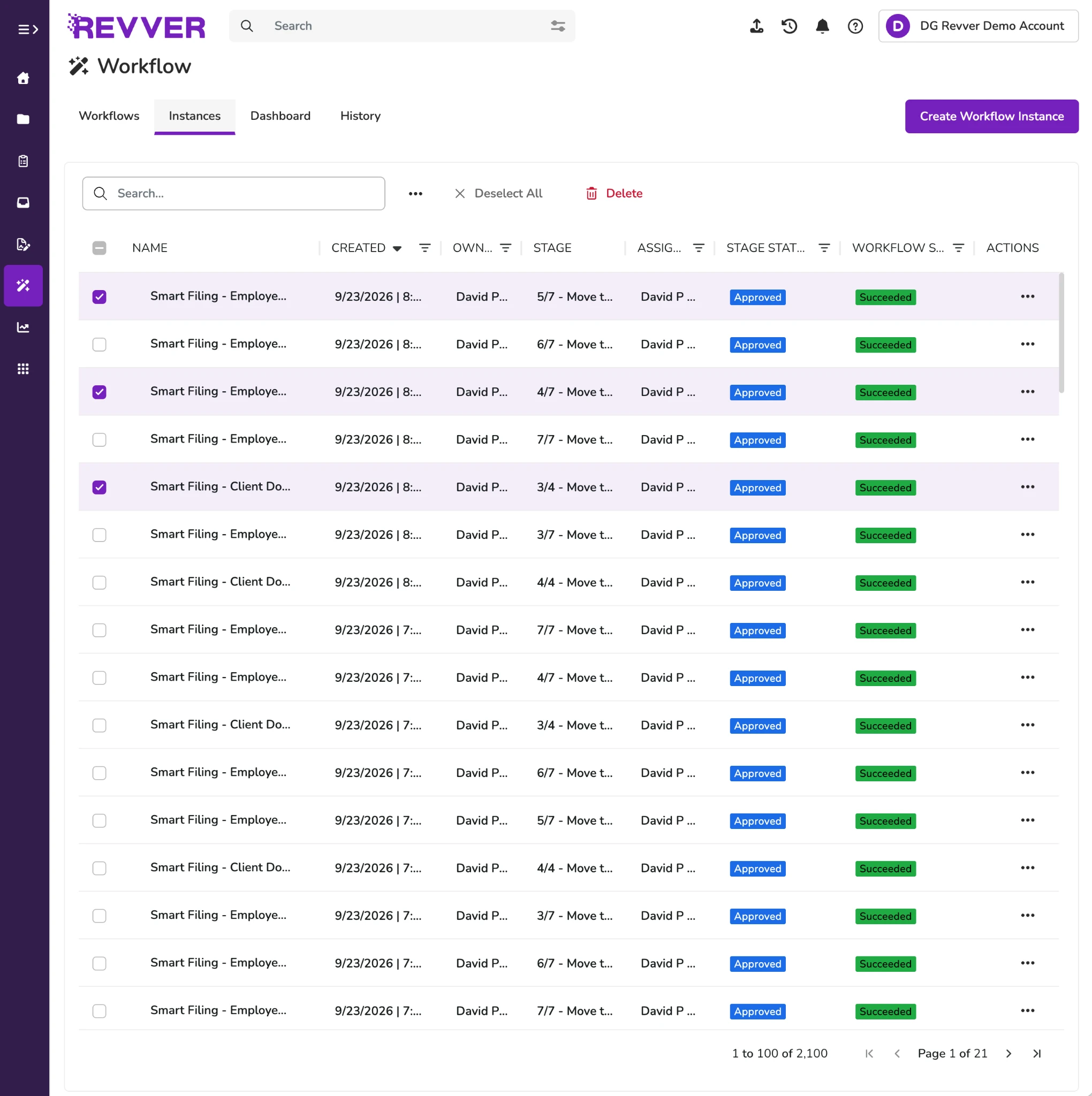
- Keep tasks moving with clear ownership
- Share with clients using access controls
Smart Extract AI
Click to expand product screen ↓
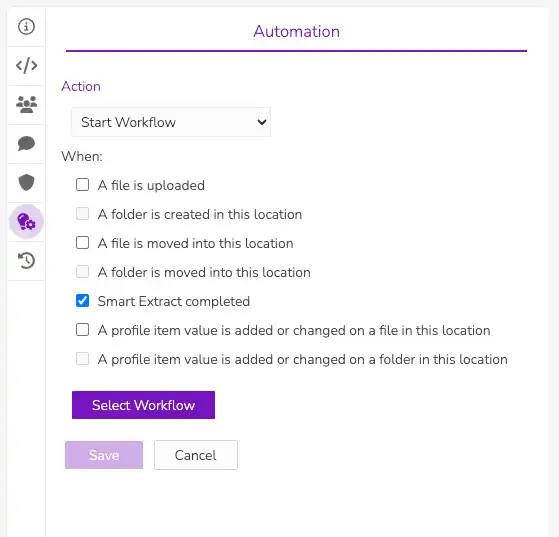
Choose the information your team needs.
Revver product view
Approval tasks in Revver
Click to expand product screen ↓
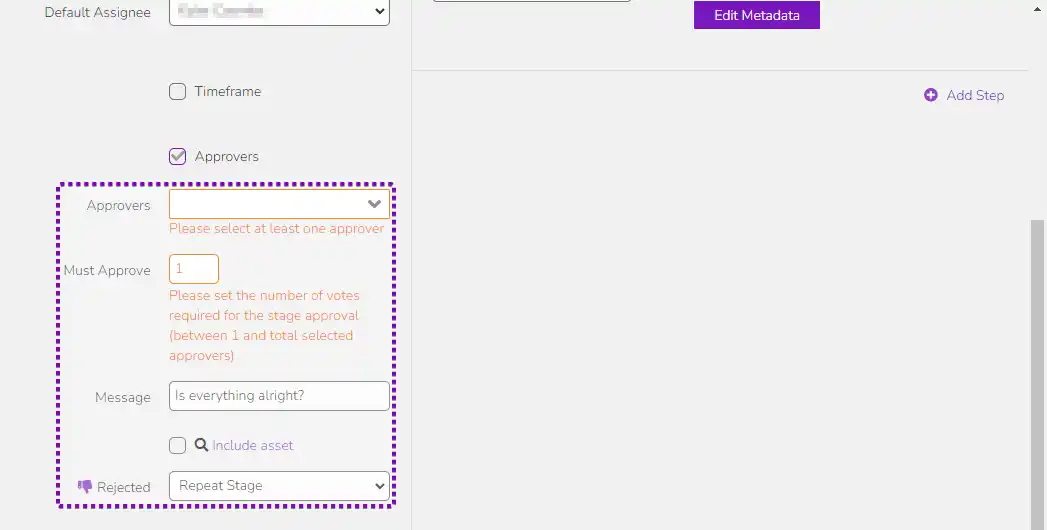
Keep approval tasks and activity in view.
Revver product view
Secure sharing in Revver
Click to expand product screen ↓
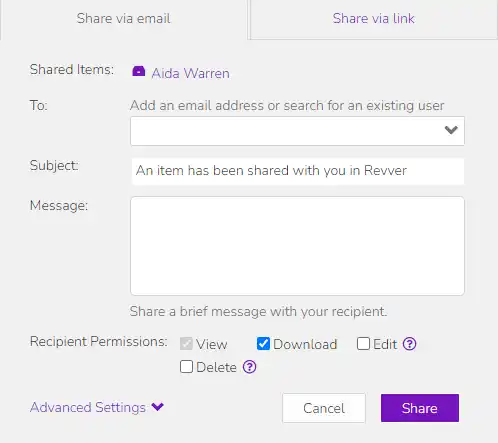
Set the access and duration for each share.
Revver product view
TRUSTED ACROSS THE FINANCIAL SERVICES COMMUNITY
Insurance Carriers & Agencies
Wealth Management & RIAs
Banks & Credit Unions
Mortgage & Lending


CUSTOMER STORY
More connected client service. Less document friction.
See how Winward Financial uses Revver.
FROM A DOCUMENT TO A COMPLETED PROCESS
Document workflows for every financial relationship.
Keep financial records connected to the right people, from the first application to the next review.
CARRIERS, AGENCIES & BROKERAGES
Keep policyholder service moving, from application to renewal.
Give agents and service teams an organized record of each client’s policies and supporting documents. Standardize intake, share files securely, and route document tasks so the next step is always clear.
Typical records: Applications, policies, renewal forms, claims documentation, and client correspondence.
- Apply consistent folder templates for each client and line of business.
- Collect supporting files through secure upload links and branded portals.
- Control access by role while helping teams service shared accounts.
Click to expand product screen ↓

See how New York Life connects client files and its CRM
ADVISORS & WEALTH MANAGEMENT TEAMS
Spend more of the client meeting on the client.
Bring onboarding documents, agreements, statements, and review materials into a consistent client file. Help advisors and service teams prepare for conversations and retrieve the records they need without searching through separate inboxes.
Typical records: Client agreements, identity documents, account statements, planning documents, and review records.
- Request and organize documents for onboarding and ongoing reviews.
- Route agreements for review and eSignature, then retain the completed record.
- Use permissions and document history to support service handoffs and oversight.
Click to expand product screen ↓
BANKS & CREDIT UNIONS
Move lending and member documents to the next step.
Connect the paperwork behind home, auto, and personal loans with the people responsible for reviewing it. Give branch staff and lending teams a reliable way to collect, find, and manage customer records.
Typical records: Loan applications, income verification, account-opening forms, disclosures, and supporting statements.
- Collect application documents in one controlled location.
- Route files for review with assigned tasks and notifications.
- Retain source documents and activity history for later inquiries and audits.
Click to expand product screen ↓
A COMPLETE FILE. A CLEAR NEXT STEP.
Collect, organize, and act on financial documents
01 / CAPABILITY
Put document data to work
Collect files from email, scans, or uploads. Smart Extract AI pulls selected details into metadata so your team can organize records and trigger the next document task with less manual entry.
02 / CAPABILITY
Give every client file a structure
Use folder templates to create a consistent home for documents. Organize files by client, account, or service, so your teams can follow the same process as relationships grow.
03 / CAPABILITY
Answer questions with the right record
Search document content and metadata to find the file for a client inquiry. Retrieve records by meaningful details instead of relying on a filename or a colleague’s memory.
04 / CAPABILITY
Make the next step obvious
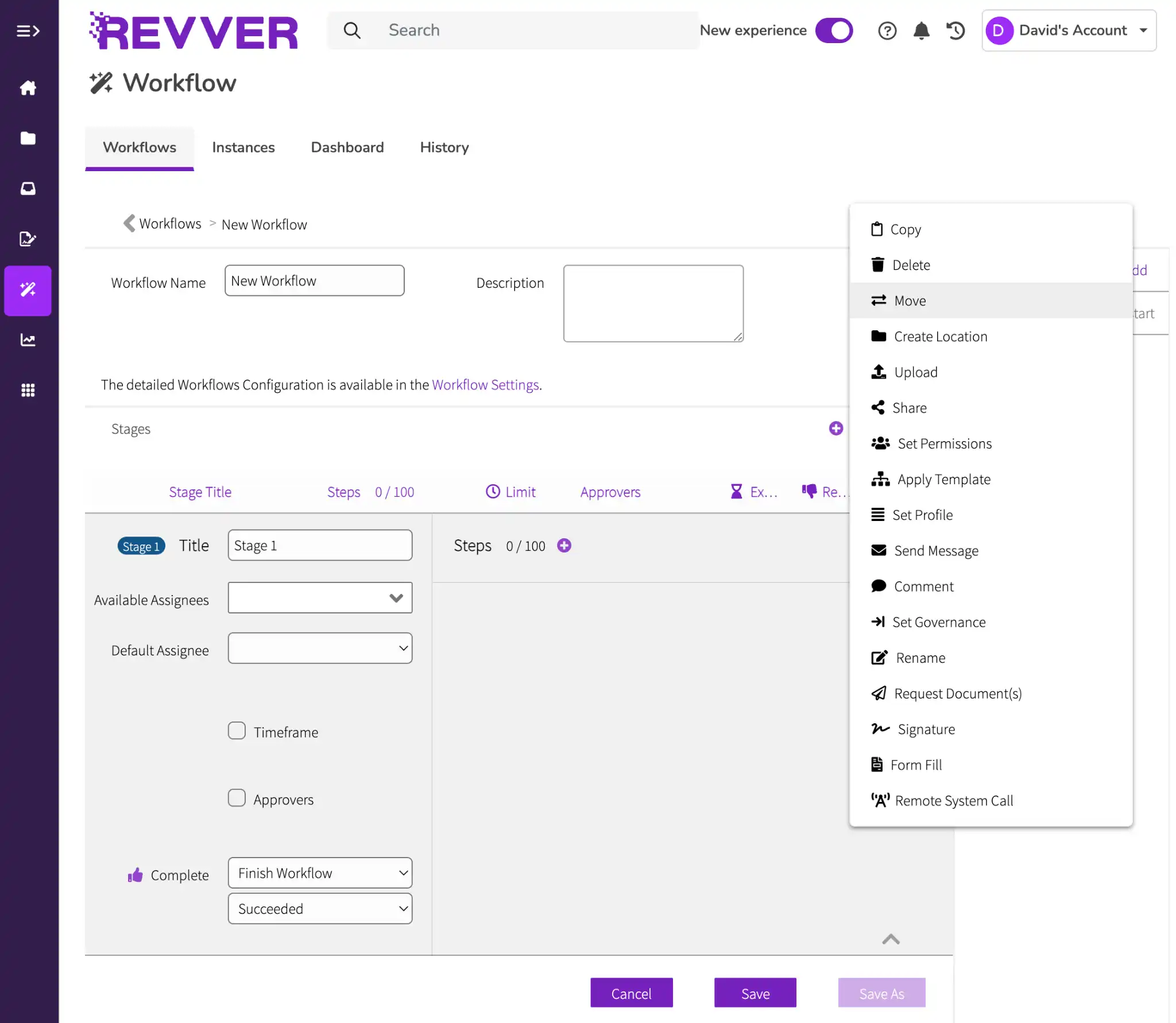
Build no-code workflows that assign tasks, route approvals, send notifications, and collect eSignatures. Set a repeatable process for onboarding, document reviews, and more.
05 / CAPABILITY
Simplify document exchanges
Send and receive sensitive files through secure links or a branded client portal. Control access and expiration, and keep incoming documents connected to the client file.
06 / CAPABILITY
Keep an accountable record
Apply retention controls, preserve version history, and review document activity. Help your team follow approved policies and retrieve supporting evidence when a file is reviewed.
CONNECTED TO THE WAY YOU WORK
Keep documents close to the systems your team uses.
Integrate with Microsoft 365, Google Workspace, and Salesforce. Use Revver’s API and integration team to scope connections to your agency, advisory, or banking systems.
Microsoft 365
Work with familiar documents and email
Google Workspace
Connect files and document work
Salesforce
Access documents alongside client records.
API & custom connections
Define the fit for your existing systems
PROTECT THE TRUST PUT INTO EVERY FILE
Support your policies. Strengthen your oversight.
Sensitive information needs well-defined rules for who can access it, how it is shared, and how long it is kept. Revver brings those controls into everyday document work.
01
Access with purpose
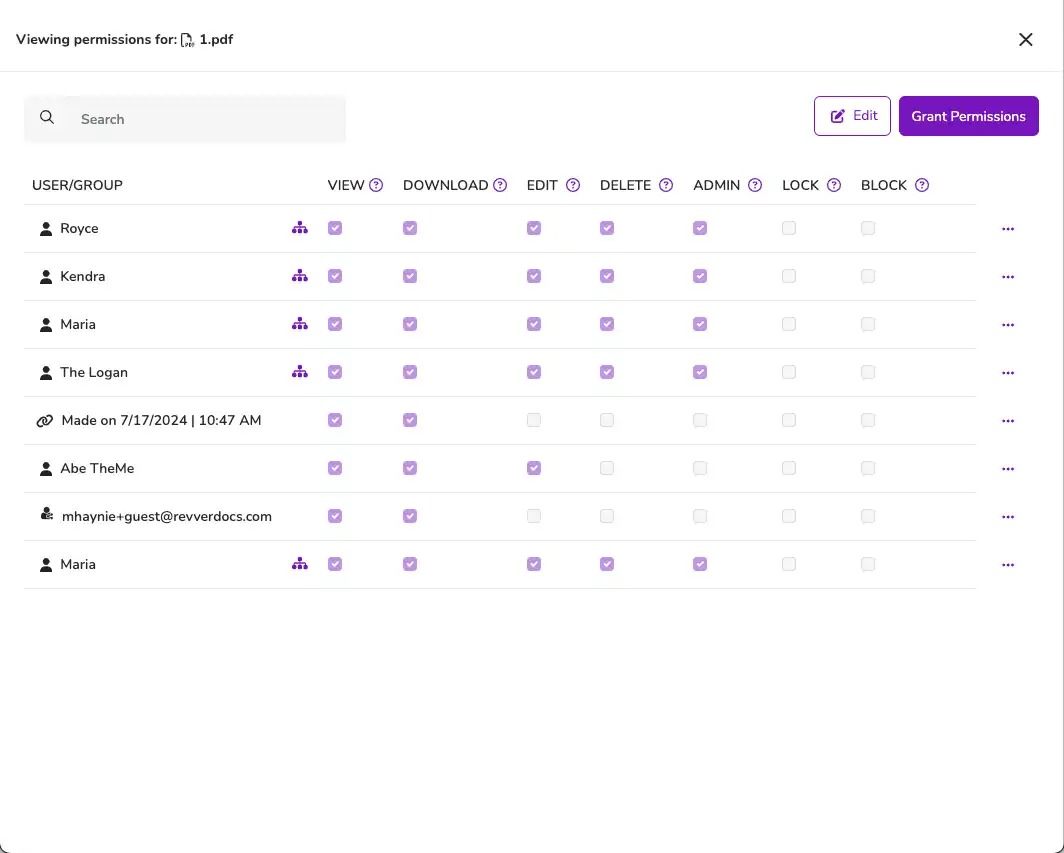
Set permissions for users, groups, folders, and files. Adjust sharing rights as responsibilities change.
02
History you can follow
Use audit logs and version history to trace document activity and prepare for reviews.
03
Retention under control
Configure retention and governance actions around your organization’s recordkeeping policies.
Recognized for excellence. Built on trust.
Audits & certifications


Ratings & awards


FINANCIAL SERVICES CUSTOMER SUCCESS STORY
More time for clients. A more connected way to work.
Sam Winward
Winward Financial Group
WINWARD FINANCIAL
Client service, document access, and compliance working together.
Winward Financial shares how Revver helps its team save time, simplify compliance work, and serve clients through secure document access, collaboration, and CRM integration.
Secure ACCESS
Client files within reach
Connected work
Documents alongside the CRM
FINANCIAL SERVICES QUESTIONS
Answers for your service, operations, and IT teams..
Explore how Revver fits your client relationships, systems, and document policies.

How does Revver serve different financial services teams?
Insurance teams can organize policyholder and claims documents; wealth management teams can connect onboarding and review records; banks and credit unions can manage lending and member files. The same document management, sharing, and workflow tools are able to be configured around each team’s process.
Can Revver help with recordkeeping and audit readiness?
Revver provides retention controls, audit logs, version history, and permissions to support your policies. It also offers WORM protections. Your compliance team determines which controls, configuration, and retention schedules meet your organization’s obligations.
Can clients and members send documents securely with Revver?
Yes. Secure upload links, form requests, and branded portals let external parties submit files. Teams can route incoming documents into the appropriate folders and control access to shared content.
Can Revver connect to our CRM or core business systems?
Revver has a Salesforce integration, connections to Microsoft 365 and Google Workspace, and an API for custom integration work. Scope your specific agency management, advisory, or core banking connection with Revver’s team. Available functionality depends on the system and integration.
How can Revver AI help with financial document work?
Smart Extract AI captures selected data from documents as metadata for organization, search, and workflow triggers. Your team chooses the fields and review process that fit your work, reducing repetitive entry while keeping document decisions with the responsible people. Plus, there are other Revver AI agents that help with summarizing, classifying, naming, and filing documents.
Can we use Revver beyond client-facing teams?
Yes. Extend document workflows to HR, accounting, and operations, including employee onboarding, invoices, agreements, and internal approvals. Apply each department’s own access rules and document structure.
LET’S START WITH YOUR WORKFLOW
See your financial services document workflow in Revver.
Bring your process, systems, and requirements. Explore how they fit with Revver’s team.
- No Credit Card Required
- Salesforce & M365 Compatible
- Cancel Anytime