


A DEMO BUILT AROUND YOUR OPERATIONS
Let's look at your logistics and distribution document work.
Explore proof-of-delivery intake, carrier onboarding, bill of lading workflows, and accounting handoffs. We'll show how Revver keeps your operations and paperwork connected.
LOGISTICS & DISTRIBUTION
Document management for logistics & distribution.
Keep goods moving and paperwork connected.
Bring shipment records, proof of delivery, invoices, and carrier files into one secure place. Revver combines built-in AI agents and no-code workflows so your operations team can find the right document and move forward.
Start with the document handoff that slows your team down.
LESS CHASING. CLEARER HANDOFFS.
Explore the product views
- Capture key details with Smart Extract AI
- Keep reviews moving with assigned tasks
- Share supporting files with access controls
Smart Extract AI
Click image to expand
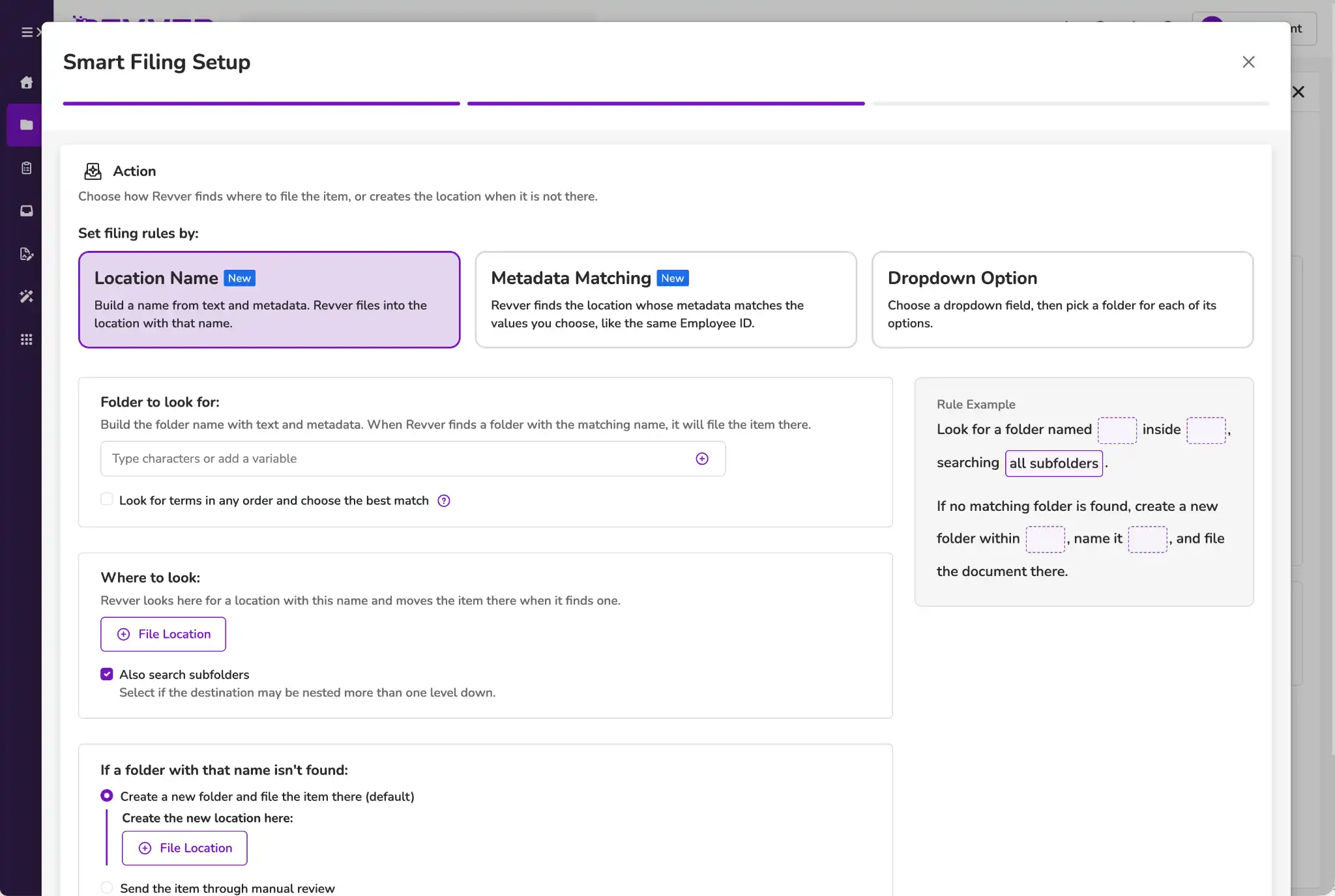
Choose the details your team needs.
LESS CHASING. CLEARER HANDOFFS.
Approval tasks in Revver
Click image to expand
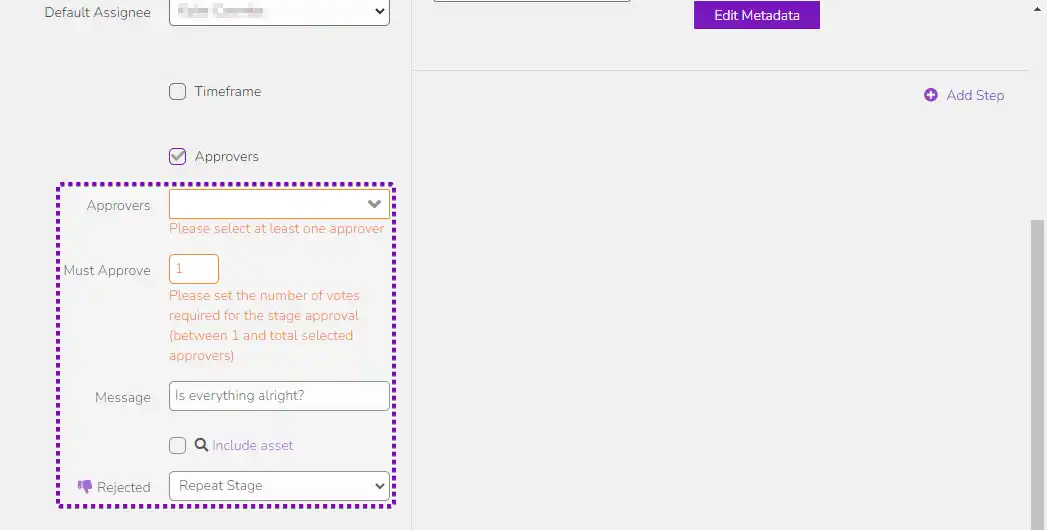
Make the next action and its owner easier to see.
LESS CHASING. CLEARER HANDOFFS.
Secure document sharing
Click image to expand
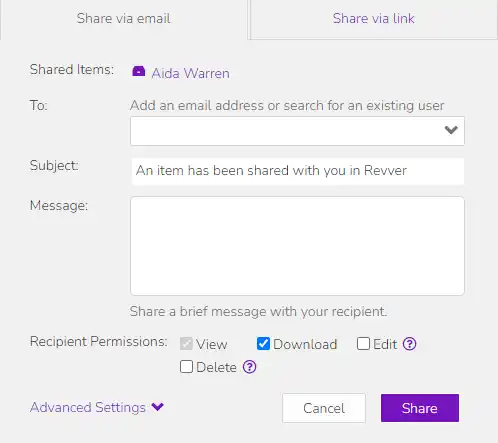
Choose who can use the documents you share.
LESS CHASING. CLEARER HANDOFFS.
LOGISTICS & TRANSPORTATION DOCUMENT MANAGEMENT
Freight & Carrier Operations
Warehouse & 3PL Logistics
Billing & Document Intake
Fleet & Compliance


CUSTOMER SPOTLIGHT
DOT paperwork. Bills of lading. Maintenance records.
See how one transportation team uses Revver across its document work.
FROM THE LOADING DOCK TO THE BACK OFFICE
The documents behind the delivery.
Connect the paperwork shared by your warehouse, operations, customer service, and finance teams.
SHIPPING, RECEIVING & PROOF OF DELIVERY
Find the paperwork behind every shipment.
When a customer asks for proof of delivery, it should be easy to find. Organize bills of lading, packing slips, and delivery receipts around the shipment so your teams can retrieve the supporting record as work changes hands.
- Collect email attachments and uploaded delivery documents.
- Use shipment numbers, customer details, and dates to connect related files.
- Give service and billing teams controlled access to the records they need.
Click tabs to inspect logistics workflow records & handoffs
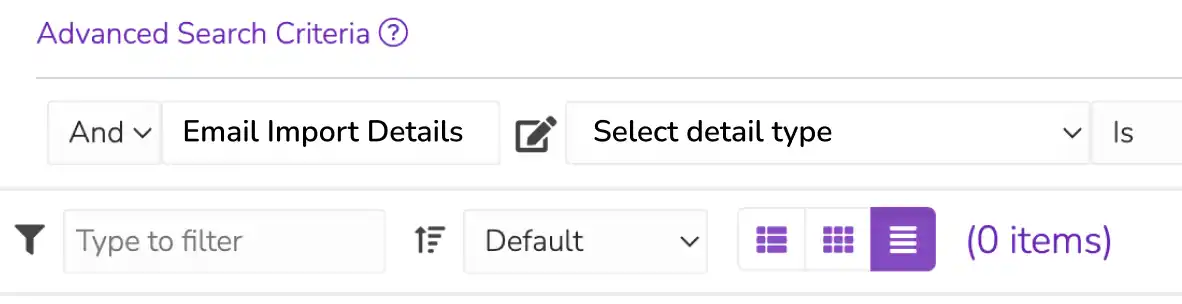
FREIGHT & SUPPLIER INVOICE APPROVALS
Move invoices through review with their context intact.
An invoice is easier to review when the supporting order and delivery paperwork are close at hand. Extract invoice details and route the document to the right reviewer, with a clear path for questions and exceptions.
- Pull vendor names, invoice numbers, dates, and amounts into metadata.
- Assign review steps and notifications using your approval rules.
- Keep the invoice, supporting documents, and approval activity accessible together.
Click tabs to inspect logistics workflow records & handoffs
CARRIER & SUPPLIER ONBOARDING
Build a complete file before the next handoff.
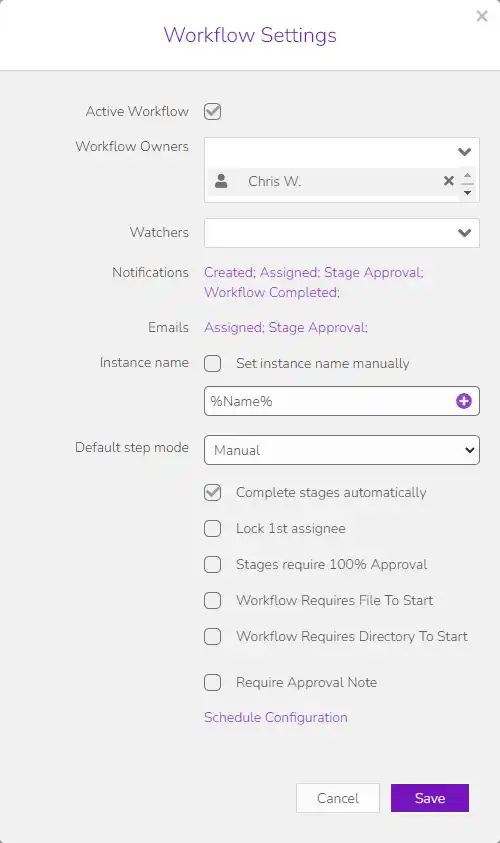
Create a consistent home for agreements, insurance certificates, and supplier records. Then make document collection repeatable so each new relationship starts with the information your team needs.
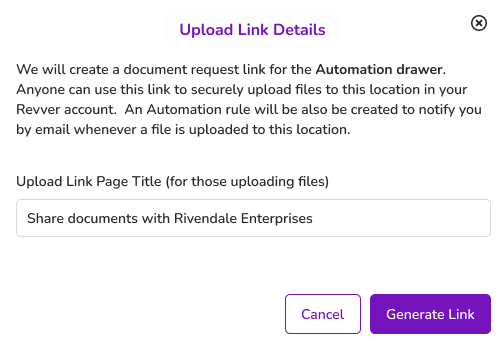
- Use folder templates and secure upload requests for a seamless intake process.
- Automatically route agreements for review and eSignature.
- Use required-document checks and date-based workflows to ensure follow-up.
Click tabs to inspect logistics workflow records & handoffs
PEOPLE, SAFETY & FLEET DOCUMENTATION
Keep operational records ready for the next review.
Organize driver and employee documents and safety paperwork by the person, vehicle, or location they support. Give authorized teams access to the right files when an internal review or staffing change comes up.
- Keep personnel and vehicle records in permission-controlled folders.
- Find supporting paperwork by document text, metadata, and dates.
- Apply your retention policies and preserve activity history.
Click tabs to inspect logistics workflow records & handoffs
A COMPLETE RECORD. A CLEAR NEXT STEP.
Less document handling. More work moving forward.
01 / COLLECT
Bring scattered paperwork together
Collect scanned files, email attachments, and secure uploads in one place. Give incoming delivery, supplier, and customer documents clear destinations.
02 / EXTRACT
Put document details to work
Smart Extract AI captures selected names, numbers, dates, and amounts as metadata. Use that information to organize files and trigger configured workflows with less re-entry.
03 / FIND
Answer questions with the right record
Search text and metadata to retrieve the paperwork connected to an order or shipment. OCR makes scanned records searchable, and Missing Item Search helps you identify gaps in your required documents.
04 / ROUTE
Give each handoff an owner
Configure no-code workflows to assign tasks, route approvals, and notify reviewers. Make the next action obvious when paperwork moves from the warehouse to operations or finance.
05 / SIGN & SHARE
Keep partners in the process
Request eSignatures on agreements and share certain documents with customers, carriers, or suppliers. Manage who can access the file and track signature progress.
06 / CONTROL
Preserve the record of the work
Combine permissions, version history, audit logs, and retention controls. Help teams manage sensitive personnel, supplier, and operational documents according to your policies.
Recognized for excellence. Built on trust.
Audits & certifications


Ratings & awards


A TRANSPORTATION CUSTOMER'S EXPERIENCE
Less paper. More room to get work done.
From DOT paperwork to bills of lading and maintenance records, Revver takes care of the work behind every haul.
Paperwork across the operation.
DOT compliance paperwork
Maintenance records
Bill-of-lading retention
TRANSPORTATION & TRUCKING
Paperwork across the operation.
“When we purchased Revver, we went from standard filing to nearly 90% paper-free. With Revver, we can keep compliance and delivery records organized without the file cabinets.”
Larry W., Safety Director
ATC Transportation
Transportation / Trucking / Railroad
CONNECTED TO YOUR OPERATION
Bring document work closer to your core systems.
Keep the systems that run your orders, warehouse, transportation, and accounting. Use Revver to manage the supporting files and document tasks.
Revver offers APIs, prebuilt connectors, and custom integration options. Work with the implementation team to scope document and data handoffs for your ERP, TMS, or WMS, including the fields and review steps your process needs.
YOUR SYSTEMS. CONNECTED DOCUMENT WORK.
ERP
Orders & business data
Accounting
Invoices & financial records
TMS
Transportation & shipments
WMS
Warehouse operations

Documents, metadata, and workflows
APIs Connectors Custom integrations
Configured around your systems and document processes.
CONNECTED WORK ACROSS YOUR BUSINESS
Take the same approach into the next department.
Finance department
Invoice approvals, accounts payable, and financial records.
Explore finance workflows
Client management
Customer intake, secure sharing, and ongoing service records.
Explore client management
Human resources
Hiring, onboarding, and employee document workflows.
Explore employee management
LOGISTICS DOCUMENT MANAGEMENT QUESTIONS
A clearer picture before you begin..
Explore the document management fit for your operational systems and team members.

What is logistics document management?
It is the organized uploading, storage, retrieval, and handling of the files associated with shipments and distribution operations. That includes bills of lading, proof of delivery, invoices, carrier agreements, and safety or maintenance records. Revver connects these documents with metadata, permissions, and document workflows.
Does Revver replace our TMS, WMS, or ERP?
Revver manages documents and their workflows alongside operational systems. Your TMS, WMS, or ERP continues to manage its core transportation, inventory, or financial processes, respectively. Integration requirements should be scoped around your specific software and the document or data handoffs you need.
Can we collect and find proof-of-delivery documents in Revver?
Yes. Bring delivery documents into Revver through uploads, email import, or scanning, then organize them by shipment, customer, or other metadata. Authorized users can search those fields and document text to find the supporting record. Consistent indexing helps you connect files to their corresponding shipments.
Can Revver AI extract information from logistics paperwork?
Absolutely. Smart Extract AI can capture selected information as document metadata for search, file organization, and configured workflows. Review representative bills of lading, delivery receipts, and invoices with Revver's team to define the fields you need and how to handle documents that require a person's review.
How can we identify missing carrier or shipment documents?
Revver's Missing Item Search lets you identify folders without an expected item matching your criteria. Use consistent folder structures and document conventions to check for records such as a required certificate or proof of delivery, then assign follow-up to the responsible person.
How does Revver support records retention and compliance work?
Permissions, audit logs, version history, and retention controls organize and govern the records your business keeps. You define the applicable requirements, retention schedules, and review procedures, including any need to preserve original documents.
Where should our team start when it comes to using Revver?
To see how Revver can benefit your business, start small. Choose one recurring process, such as delivery-document collection, freight invoice review, or carrier onboarding. Bring a sample document packet and the people involved. Revver's in-house team can then evaluate the workflow, configuration, and integration needs.
START WITH YOUR NEXT DOCUMENT HANDOFF
Keep the goods moving. Put the paper to work.
Explore the fit for your shipment and document workflows.
- Fast Onboarding & ERP Integration
- SOC 2 Type II & ISO 27001 Certified
- No Long-Term Lock-in