


A DEMO BUILT AROUND YOUR PORTFOLIO
Let’s look at your property and real estate document work.
Explore lease onboarding, tenant files, maintenance workflows, AP invoice routing, and property management integrations with Revver’s team. Bring your current process to an introductory walkthrough.
PROPERTY MANAGEMENT & REAL ESTATE
real estate document management software
Less document work. More time for properties and people.
Bring leases, tenant files, and property records into one secure place. With built-in AI agents, no-code workflows, and hands-on support, Revver helps your team spend less time chasing paperwork so work keeps moving across your portfolio.
See how Revver’s document management software fits your team and processes.
FROM DOCUMENTS TO WORK DONE
Expand view
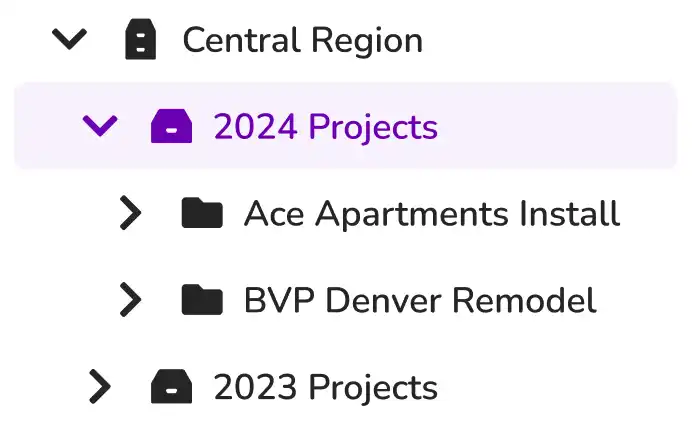
An organized property file
Click to expand product screen ↓
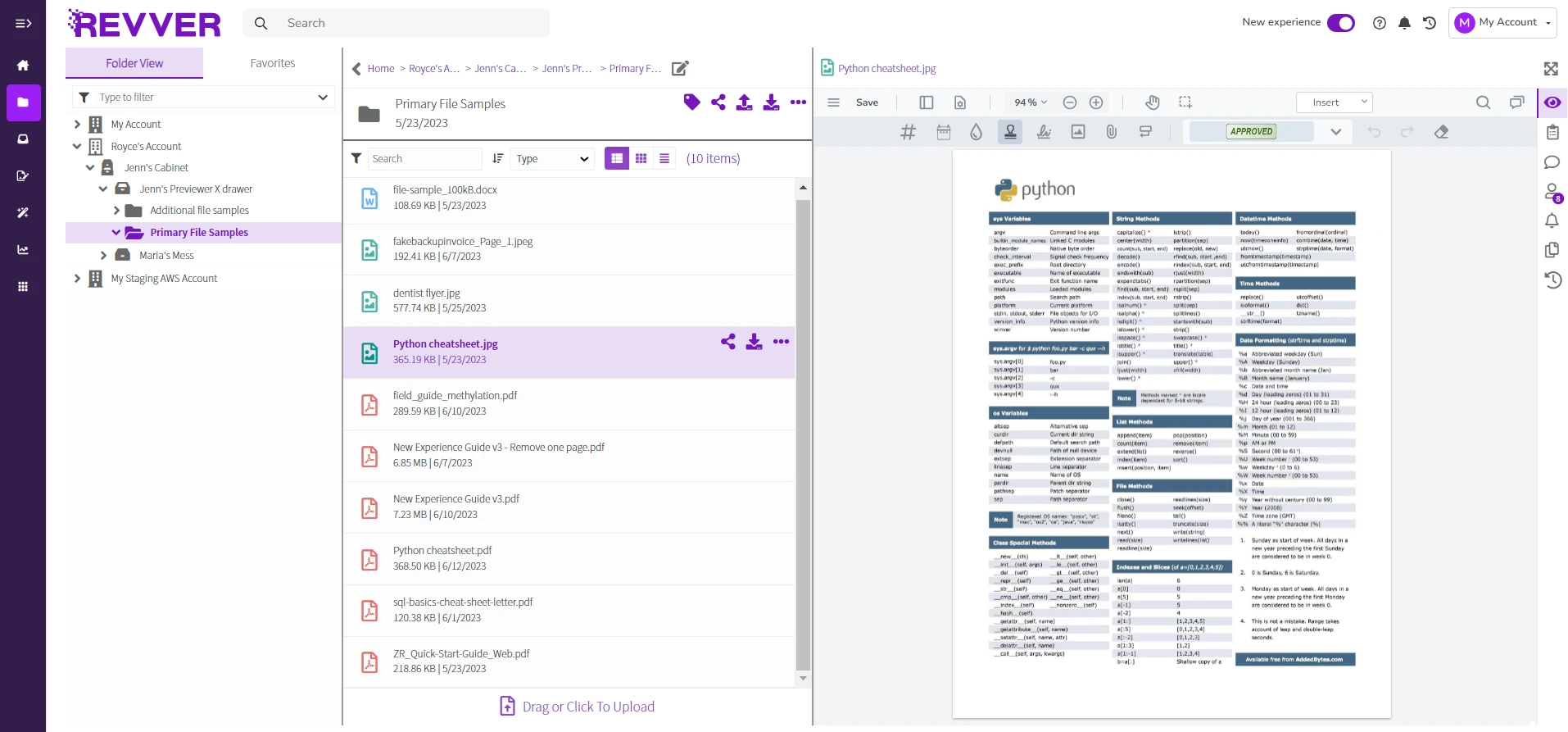
A consistent home for the documents connected to each property.
Revver product view
Smart Extract AI
Click to expand product screen ↓
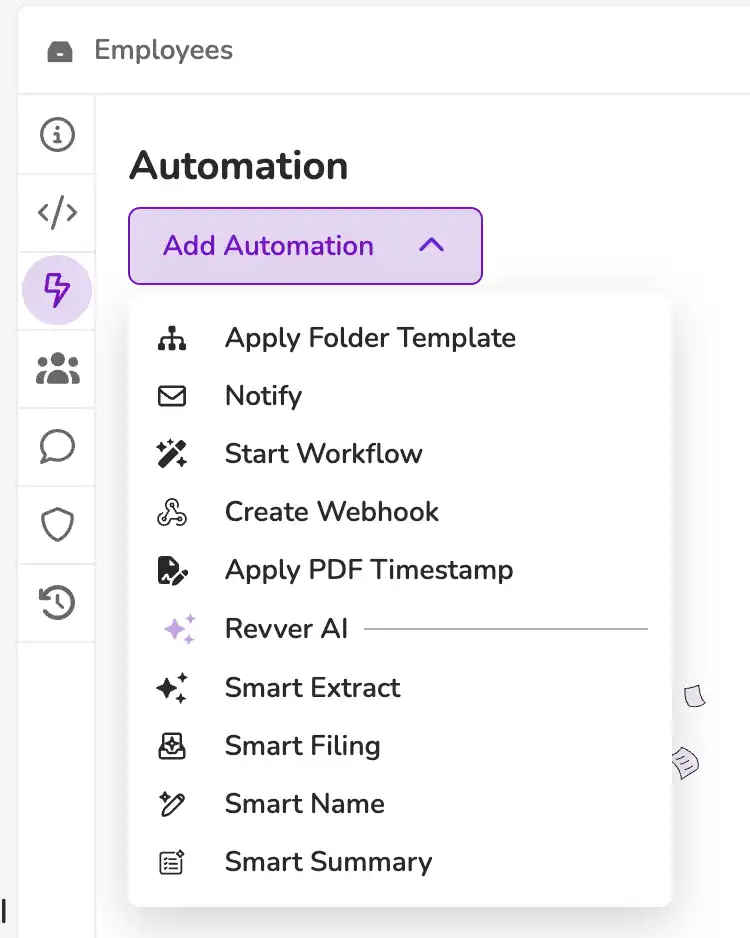
Choose the details to capture and use in your document workflows.
Revver product view
Approval tasks in Revver
Click to expand product screen ↓
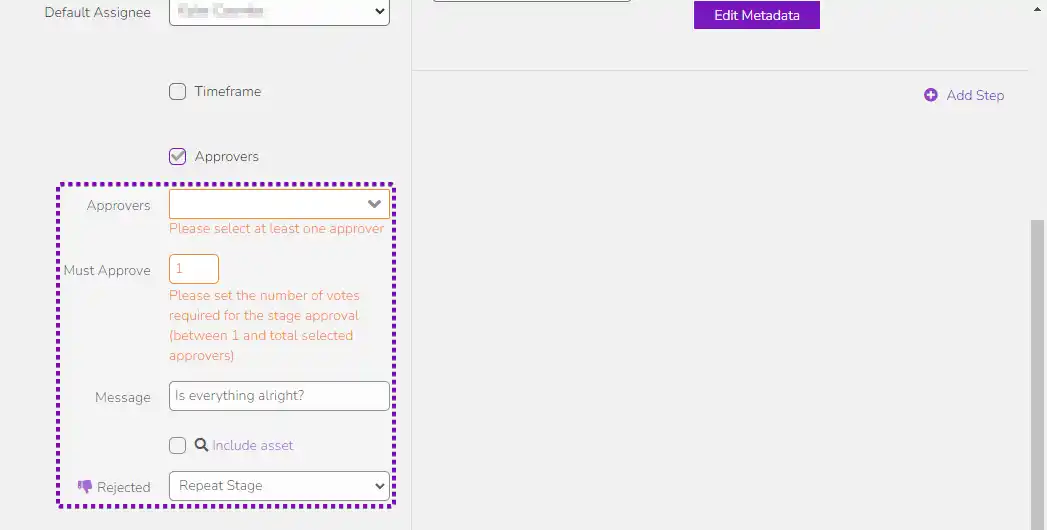
Give your team a clear view of document tasks and approvals.
Revver product view
DOCUMENT WORK ACROSS YOUR PORTFOLIO


Residential & multifamily
Commercial real estate
Property management
Real estate operations
REAL ESTATE CUSTOMER RESULT
Over $120,000 in annual savings.
Commercial real estate firm · Customer-reported results
FROM A DOCUMENT TO A COMPLETED PROCESS
Keep work moving throughout the property lifecycle.
Explore the document work behind your next move-in, repair, approval, or closing. Our document management system for real estate simpfies workflows and makes organizing and finding files quick!
FROM APPLICATION TO MOVE-IN
Keep the next lease moving.
Give your team a repeatable path for application paperwork, approvals, and signed agreements. Collect supporting files in Revver’s secure storage and make the next document task visible.
Typical records: Rental applications, supporting documents, leases, and move-in forms.
- Request documents through secure upload links.
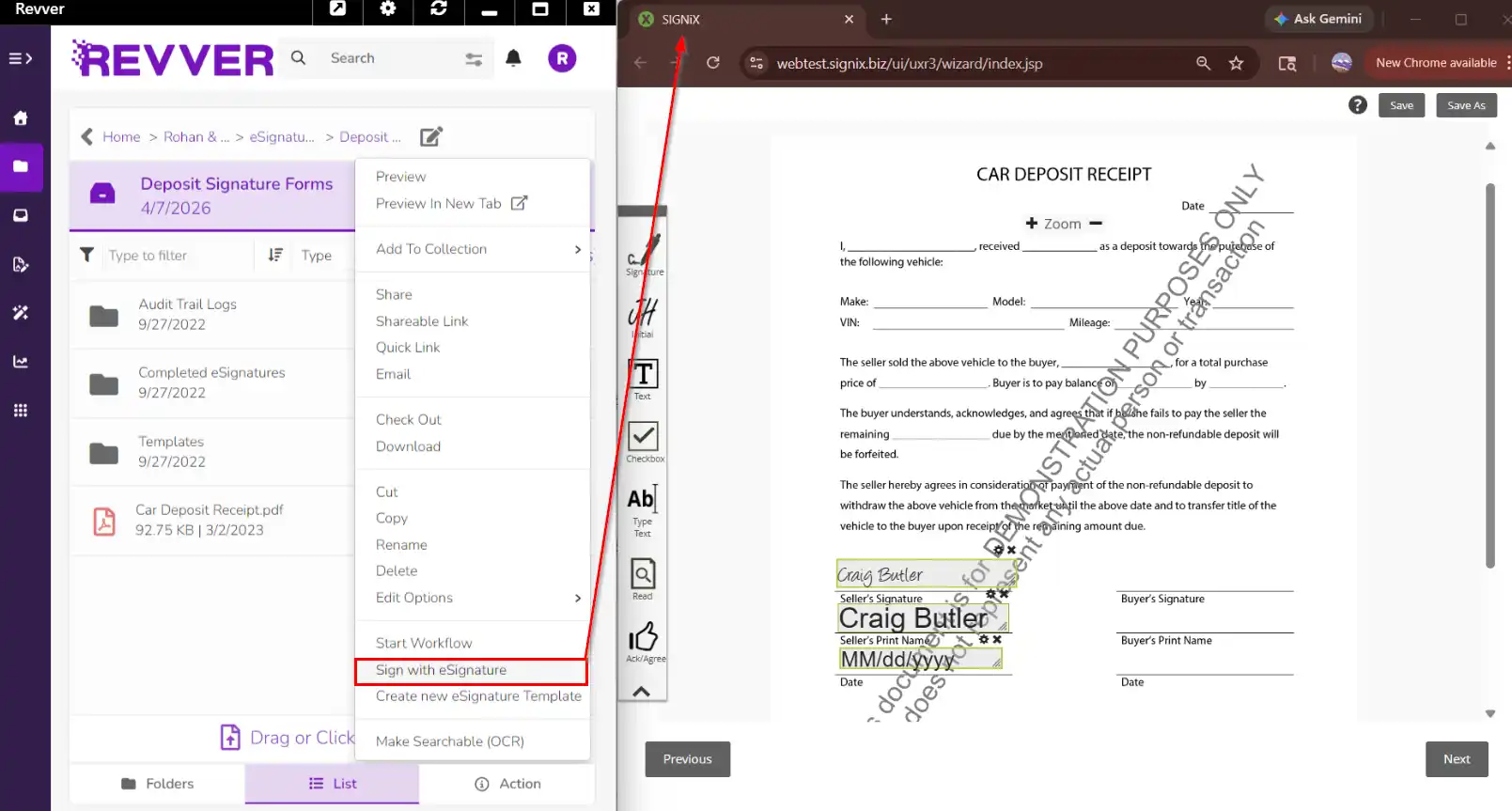
- Route lease paperwork for review and eSignature.
- File signed agreements with the right property and tenant.
Click tabs to inspect property records & workflow stages
THROUGHOUT THE TENANCY
Find the full tenant history in one place.
Answer questions about a lease, renewal, or notice with the relevant documents at hand. A consistent filing structure helps the next person pick up where the last one left off.
Typical records: Lease amendments, notices, correspondence, and move-out records.
- Organize records by property, unit, tenant, and document type.
- Search document content and metadata when filenames are unclear.
- Preserve earlier versions while keeping current agreements easy to find.
Click tabs to inspect property records & workflow stages
KEEP PROPERTY WORK MOVING
Connect the paperwork to the actual work.
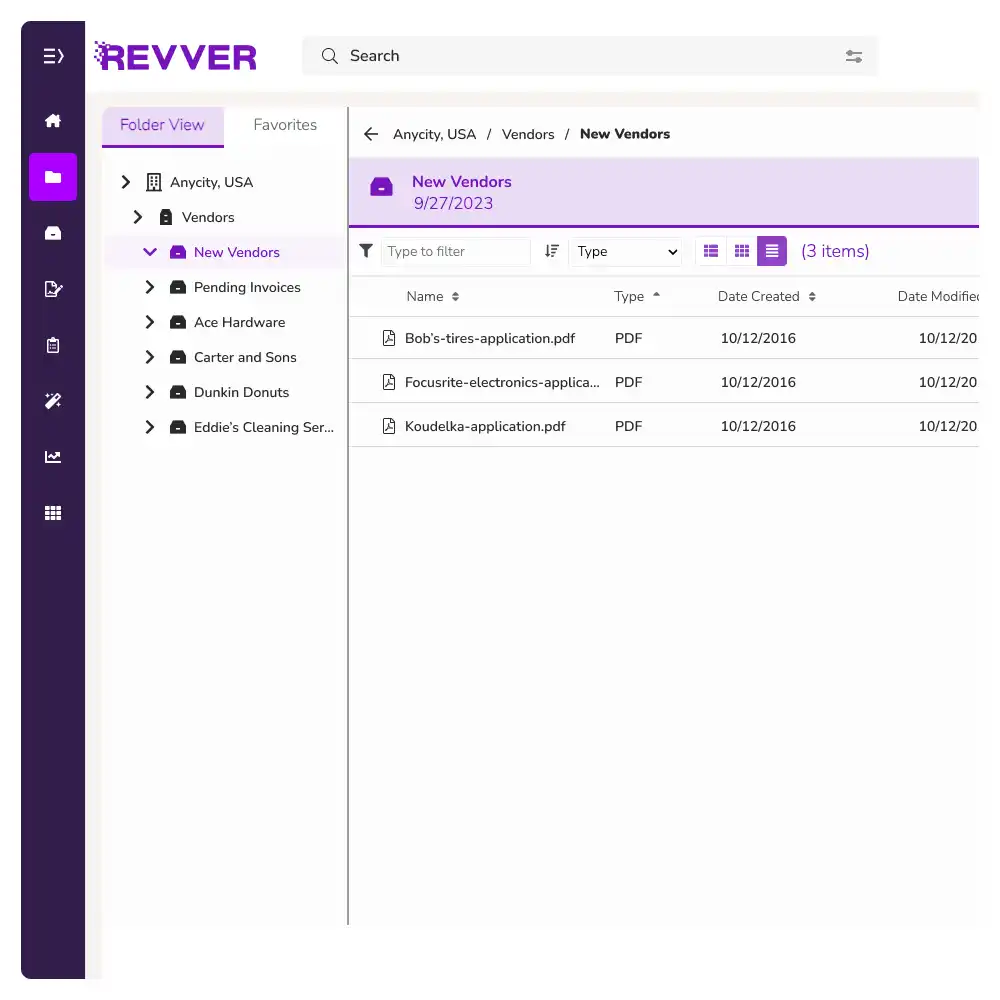
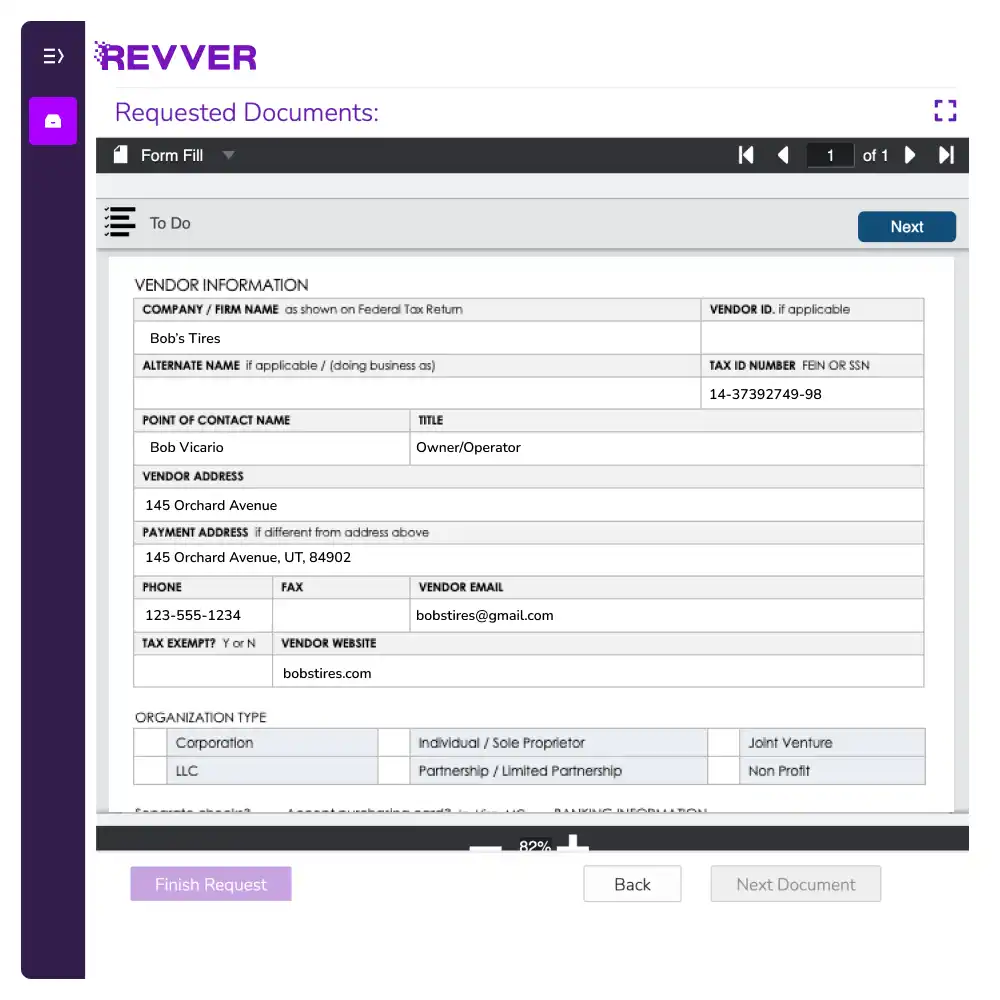
Keep maintenance documentation and vendor files connected to the property. Send documents to the people responsible for review, and retain the supporting record when work is complete.
Typical records: Work requests, estimates, service agreements, insurance certificates, and invoices.
- Receive vendor paperwork through secure document requests.
- Route estimates and service documents for approval.
- Hold onto completion records for future reference.
Click tabs to inspect property records & workflow stages
ACROSS PROPERTIES AND ENTITIES
Give every invoice a path to the right approver.
Reduce repetitive handling of utility bills and vendor invoices. Extract key details, route documents to the responsible approver, and keep source files available when accounting needs them.
Typical records: Utility bills, vendor invoices, purchase orders, and payment support.
- Pull invoice amounts, dates, and other configured fields with Revver AI.
- Use defined approval steps, and review exceptions.
- Organize supporting records by property and accounting period.
Click tabs to inspect property records & workflow stages
FROM DUE DILIGENCE TO CLOSE
Bring every deal’s documents together.
Give acquisitions, asset management, and transaction teams an organized place to find deal documents. Control access to sensitive records, and preserve the agreements and supporting files your team needs after closing.
Typical records: Purchase agreements, inspections, due diligence files, and closing documents.
- Create a repeatable folder structure for each property or transaction.
- Share designated documents with external participants.
- Track document versions, reviews, and completed signatures.
Click tabs to inspect property records & workflow stages
WORKS ALONGSIDE YOUR CORE SYSTEMS
Connect document work to the way you already operate.
Revver’s APIs and prebuilt connectors let it integrate with other enterprise tools. Explore how your property management and accounting applications can exchange documents or data with Revver AI.

ONE DOCUMENT PLATFORM FOR EVERY PROPERTY.
Organize and find your real estate documents.
01 / EXTRACT
Turn paperwork into searchable information.
Use Smart Extract AI to capture names, dates, amounts, and custom metadata. Put those details to work in search and configured workflows.
02 / SEARCH
Find the file to answer a question.
Search by document content or details such as property, tenant, and document type. Avoid having to retrace someone else’s filing decisions.
03 / ROUTE
Move reviews out of the inbox.
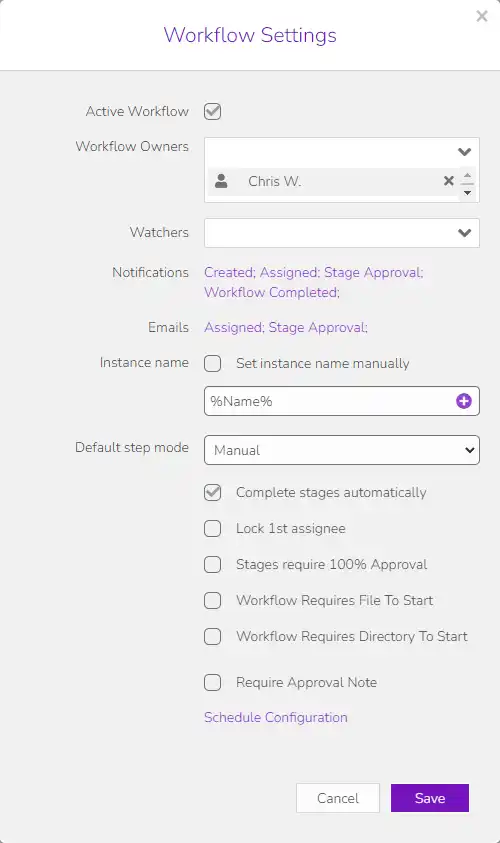
Define the steps, owners, and notifications for repeatable document work. No-code workflows help teams move forward with approvals fast.
04 / SIGN
Keep signatures connected to the file.
Prepare reusable eSignature templates, track signing status, and route completed agreements into your document process. Signers can use a desktop or mobile device.
05 / SHARE
Make document exchange easier.
Give applicants, tenants, vendors, and partners a secure way to send requested files. Share selected documents through controlled links and portal access.
06 / CONTROL
Preserve a history you can follow.
Use version history, activity logs, and retention controls to manage the document lifecycle and support your organization’s review requirements.
WHY REVVER
More properties shouldn’t mean more document chaos.
A repeatable structure.
01 / CONSISTENCY
Use folder templates to give property and tenant files a familiar format from one location to the next. Help your teams find what they need as your portfolio grows.
Automation your team can manage.
02 / EVERYDAY USABILITY
Start with familiar folder structures, then add no-code workflows for document reviews, requests, and approvals. Build around the process your team needs.
People who know the platform.
03 / DIRECT SUPPORT
Work with Revver’s own implementation and support team to organize your files, configure your process, and help employees get comfortable.
CONTROL THROUGHOUT THE DOCUMENT LIFECYCLE
Put sensitive files in the right hands.
Tenant information, financial documents, and transaction records need clear access rules. Give people the information their role requires while keeping document activity visible.
01
Access by role and responsibility
Control who can view, edit, download, or share specific files and folders.
02
A traceable document history
Review file versions and audit logs when questions arise about a document.
03
Retention that follows your policies
Apply governance and scheduled actions in line with your organization’s requirements.
Recognized for excellence. Built on trust.
Audits & certifications


Ratings & awards


REAL ESTATE CUSTOMER SUCCESS
Less paper. Lower costs. A more connected business.

COMMERCIAL REAL ESTATE
Approx. 1,000 employees
Multifamily & commercial properties
$120,000+
in annual savings
ONE PLATFORM, MULTIPLE DEPARTMENTS
A real estate firm turned document overhead into savings.
An East Coast commercial real estate firm used Revver to bring fragmented document work together across property operations, accounting, HR, and other teams.
Automated bill processing and secure electronic document exchange reduced manual handling. The firm reported $63,750 in annual copier lease savings and $60,000 in annual printer contract savings.
“With Revver, I can take someone who’s used a computer before and teach them everything they need to know in an hour.”
Kris V. · Director of IT
10,000
monthly electric bills processed automatically
145
printers eliminated
$123,750
in combined annual copier lease & printer contract savings
Customer-reported results from Revver’s published case study.
START WHERE THE DOCUMENT WORK PILES UP
One priority process. A foundation for the whole portfolio.
Choose your starting point.
Step 1
Bring a real process: tenant onboarding, vendor documents, invoice approvals, or transaction files.
Build it with Revver’s team.
Step 2
Plan your folder structure, permissions, migration, and workflow steps with in-house specialists.
Extend what works.
Step 3
Apply the approach across properties and departments as you identify the next document process to improve.
PROPERTY & REAL ESTATE DOCUMENT MANAGEMENT
Answers for your property and operations teams..
Explore how Revver fits your workflows and existing systems.

What is property management document management software?
It’s a mouthful, but it brings property, tenant, vendor, and business files into an organized system for search, sharing, review, and retention. That was long-winded, too. It’s okay, though. It’s all about simplifying complex processes. Revver supports the document work that spans leasing, maintenance, accounting, and real estate operations.
How does Revver fit with our property management software?
Use Revver to manage the documents and workflows surrounding your property operations. Keep your core property management platform for its operational functions. Revver has APIs and prebuilt connectors to help you integrate with it. Your team can confirm the connection options for your specific applications.
Can Revver help us manage leases and tenant onboarding?
Yes. Your teams can collect application documents, route paperwork for review, request electronic signatures, and organize completed agreements. Folder templates let you create a consistent structure for each property or tenant.
Can tenants, vendors, and partners send files securely via Revver?
Yes. Revver has secure upload links and document requests for external participants. Incoming files can go to designated folders and even get classified and renamed once they go through Revver AI agents. Configure sharing and access around the documents each participant needs.
How can Revver AI help with property and real estate documents?
Smart Extract AI captures configured metadata from documents to support search and workflows. Smart Summary creates document synopses. And there are several other AI agents that work alongside these two tools in Revver. Your teams can include human review in their workflow for extracted details that need validation.
How does Revver support document retention and audit preparation?
Revver provides retention controls, scheduled governance actions, version history, and activity logs. Set permissions and retention rules for your organization’s requirements, and keep supporting documents available for review.
Can we start with one team or document process in Revver?
Start with a priority such as lease paperwork, vendor files, or invoice approvals. Work with Revver’s in-house team on organization, migration, permissions, and workflow setup, then extend the approach to other properties and departments. We think you’ll be pleased with the results.
LET’S START WITH YOUR WORKFLOWS
Bring order to every property’s paperwork.
Bring a document process your team wants to improve. See what it could look like in Revver.
- Configured for Real Estate Portfolios
- SOC 2 Type II & ISO 27001 Certified
- Dedicated In-House Implementation